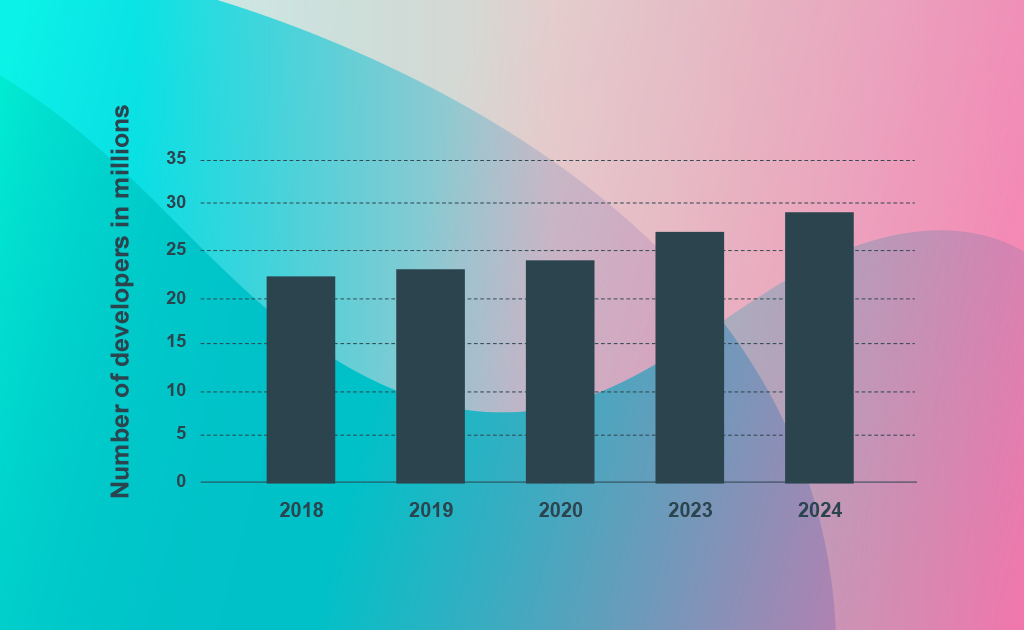
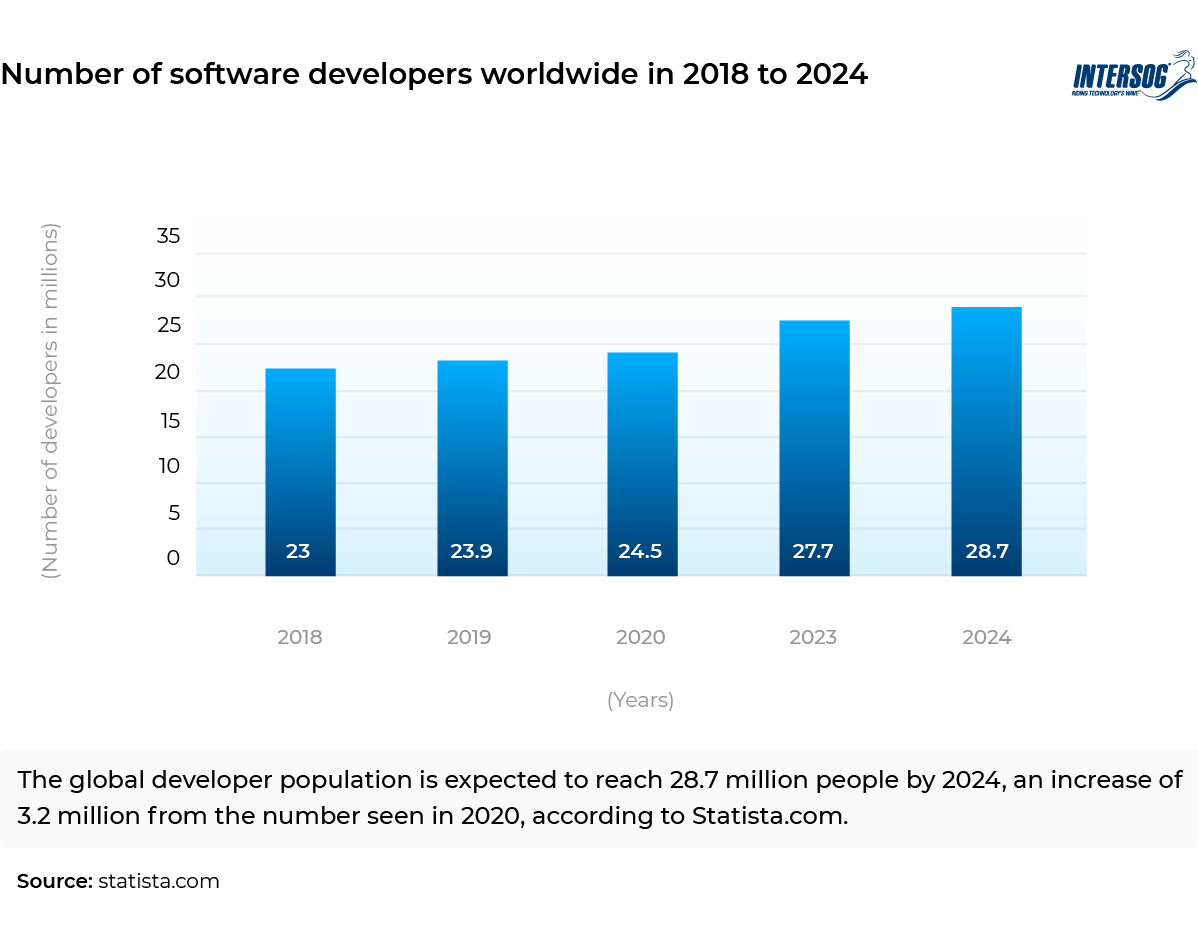
Remote work always existed, but it came into the limelight in 2023
As a consequence of the global pandemic, decision-makers across the world quickly ran out of options and accepted, willing or unwillingly, the possibilities of the work-from-home concept, reshaping the tech industry forever.
The historical narrative of remote development goes back nearly 50 years. Jack Nilles, a former NASA engineer, coined the term “Telecommuting” and ignited the idea of Remote-Work in 1972. After years of sluggish growth, the remote-working trend finally sped up after the Covid-19 outbreak. With a dichotomy of opinions and experiences, some companies adopted it confidently, while others remain doubtful.
Fluid Workplace – A popular choice in the IT industry
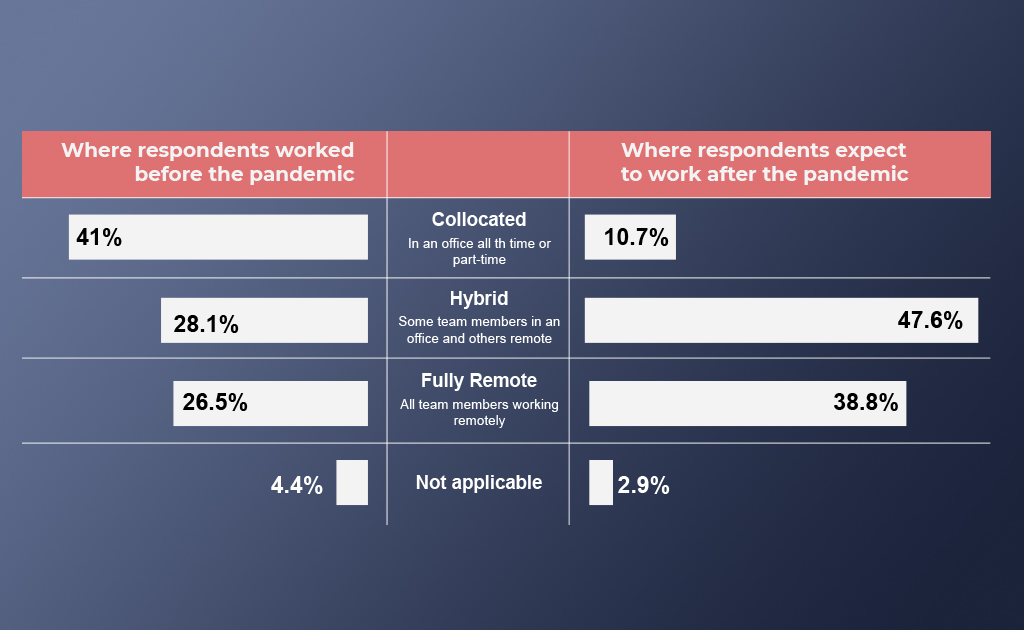
The pandemic has tipped the scales towards a remote-friendly world. The State of the Octoverse report 2021 by GitHub unveils work preferences before and after the pandemic.
– 10.7% of developers expect to work from the office after the pandemic.
– 46.6% of developers expect a hybrid work environment.
– 38.8% of developers expect to work fully remote.
A vast majority of developers prefer a fully remote or hybrid work environment, highlighting the importance of fluid workplaces in the post-pandemic era. And the Future of Work survey by Growmotely accentuates it even further:
– 76% of entrepreneurs & 74% of professionals believe that remote work will become the new normal.
– 97% of entrepreneurs & professionals want to continue working remotely in the post-pandemic era.
– 61% of employees prefer a completely remote work environment.
Fluctuations in Remote Productivity
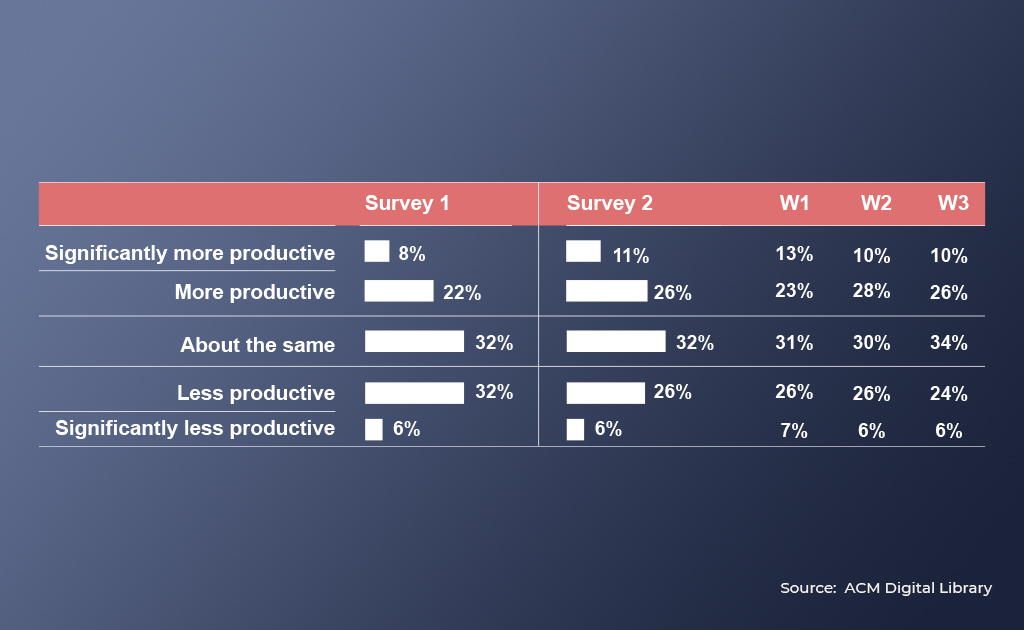
The ACM Digital Library survey paints a clear picture of the changes in productivity while working remotely:
A majority of developers reported that the productivity level stayed the same or improved (62%-68%) in both surveys. Nevertheless, a considerable percentage of developers claimed that they felt less productive (32%-38%).
Balancing the Imbalanced in the New Remote Normal
The opportunities of remote work in software development can easily outweigh the drawbacks.
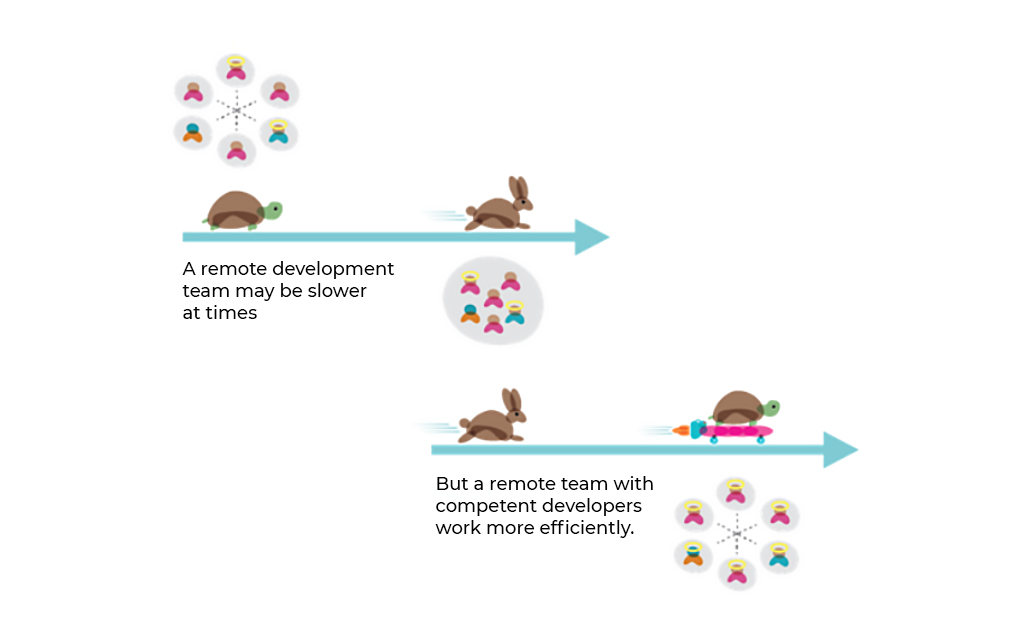
A remote development team can be as efficient as a colocated team, if not more so. With quality sourcing, rigorous vetting, dedicated project managers and seamless communication, IT outsourcing agencies can meet the escalating demands for software development with ease.
But what constitutes a well-oiled remote ecosystem in the IT industry?
Build a network of the industry’s finest remote developers through elaborate screening.
Assign dedicated managers for each project to ensure optimum performance accountability.
Maintain effective communication channels to keep the clients in the loop at all times and facilitate a transparent development process.
Eliminate the time difference issue by building a team that works across multiple time zones, with at least 4 hours of overlap.
Employ visionary leaders who can direct the team members, and inspire them to take initiative and innovate.
An IT outsourcing agency can transform itself into a full-fledged technology partner and help businesses across the globe by following the 5 points mentioned above.
And what are the key benefits offered by a fluid workplace?
Remote-friendly organizations can expand their search and find the best developers without geographical limitations, a win-win situation for employers and employees.
Remote work helps outmaneuver unfair work environments and biases. In a remote environment, the behavioral traits of employees get rather sidelined and the work gets more focused on results.
Last but not least, it can help eliminate employability barriers for people with depression and anxiety, letting them work comfortably from wherever they prefer.
In a nutshell,
Remote work is a multi-faceted concept, there are countless strategies that an organization can adopt to integrate remote developers seamlessly.
With the technologies and platforms we have in place in the post-pandemic era, success through remote collaboration is easily achievable.
Effective communication, minimized distractions and satisfied employees are some of the perks that can be unlocked with a well-managed fluid workplace. From entrepreneurs to enterprise owners, companies with effective remote working patterns have a significant competitive advantage for the foreseeable future.
Ignore it or adapt with it, the remote revolution is here to stay.
Svelte VS React – This ongoing debate started after the inception of Svelte and we’re here to end it.
This is a battle between the new game-changer (Svelte) and the veteran of user interfaces (React). In this article, we will help you choose the ideal technology for your next project by conducting a short comparison of different aspects without taking sides.
The best way to start the comparison between React VS Svelte is a quick overview with simple definitions.
What is Svelte?
The new game-changer.
Svelte is a revolutionary new method for creating user interfaces. Svelte puts that work into a compile stage that occurs when you build your app, as opposed to standard frameworks like React and Vue, which perform the majority of their work in the browser.
Svelte creates code that precisely updates the DOM whenever the state of your app changes rather than employing strategies like virtual DOM diffing.
What is React?
The veteran of user interfaces
React is a JavaScript-based UI development library. It is controlled by Facebook and an open-source development community. React is a popular library in web development even though it isn’t a language. The library made its debut in May 2013 and is currently one of the front-end libraries for web development that is most frequently used.
Beyond only UI, React includes a number of extensions for supporting the architectural design of complete applications, including Flux and React Native.
Is Svelte Faster than React?
React has a much steeper learning curve. Svelte also lets you build a more intuitive and cleaner code base. As a lightweight framework, Svelte is ideal for building small-scale websites and apps at rapid development speed. Additionally, apps created with Svelte run seamlessly, and styling with it is child’s play.
But this isn’t enough to find out which one is better between React and Svelte. We need a detailed comparison of different aspects.
Svelte VS React: Complete Comparison
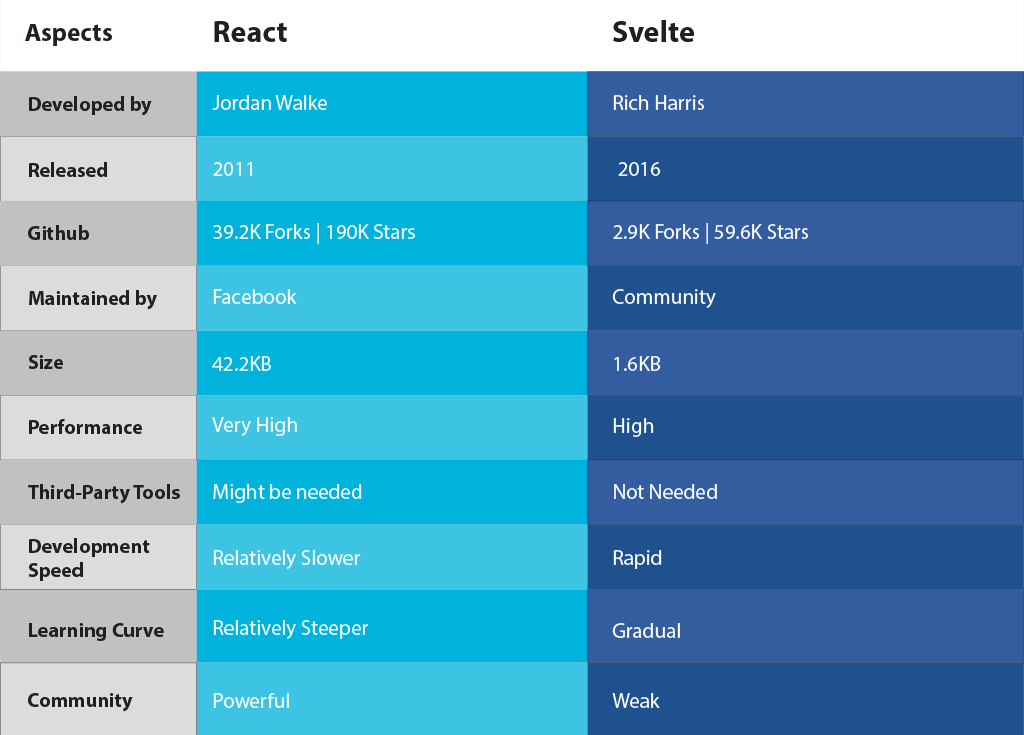
Here’s a complete comparison table for a quick understanding of the battle between React VS Svelte.
React vs Svelte: Comparing Pros and Cons
Svelte
Pros:
Superior performance due to its compilation process.
Smaller bundle sizes, lead to faster load times.
Simpler syntax and easier learning curve.
Minimal runtime overhead.
Cons:
Smaller community compared to React, resulting in fewer resources and libraries available.
Limited tooling and ecosystem when compared to React.
Less mature and adopted in the industry compared to React.
React:
Pros:
Large and active community with extensive resources and libraries available.
Widely adopted in the industry, making it easier to find developers and support.
Virtual DOM implementation for efficient updates and rendering.
A robust ecosystem with a variety of tools and frameworks built around React.
Cons:
Larger bundle sizes and potentially slower performance compared to Svelte.
A steeper learning curve, especially for beginners.
Requires familiarity with JavaScript and JSX syntax.
Difficult to set up and configure.
Svelte VS React: Performance
Performance is the first thing that developers should concern themselves with. When comparing React VS Svelte, the application performance helps you decide which one to use for building complex web applications.
How well does a Svelte application perform?
The Svelte framework is so well-optimized that it provides top-notch flexibility when it comes to generating high-quality code while compiling. Interface navigation and faster loading are possible due to the reduced runtime overhead.
Also, you can develop powerful and sophisticated apps as Svelte eliminates the concerns and difficulties associated with Virtual DOM and concurrent mode.
How well does a React application perform?
React features a component-based architecture that helps software applications, especially single-page apps, to be faster, more usable, lighter, and more functional. This framework enables you to create reusable components, which eliminates code clutter and improves development efficiency and consistency.
Furthermore, DOM modification contributes to a faster page load time and a more consistent user experience. To improve app performance, React uses well-optimized coding methods. Developers, for example, employ DRY (Don’t Repeat Yourself) to minimize errors in code and increase efficiency.
Svelte VS React: Architecture
Svelte VS React: Architecture
The architecture of a framework or library plays an important role in the development process. Between React VS Svelte, the architecture defines how easy and fast the development of an application will be.
What’s the architecture of Svelte?
The architecture of Svelte has been designed to work faster than any other library. This is achieved by skipping the process of leading a framework for creating a virtual DOM. It’s compiled to JavaScript at the initial stage instead of utilizing a tool for the running process, enabling the developer to develop an application without any kind of dependencies.
What’s the architecture of React?
React is a collection of components that update the user interface whenever the data is modified. It helps display information in the web applications’ view layer. React’s internal design is quite robust as a result of this ongoing interplay between user actions and component states.
Svelte VS React: Testing
Testing is a significant part of the development process. Without testing, the application may cost more to fix than it did to develop. Hence, ease of testing is an important aspect when comparing React VS Svelte.
Is it easy to test an application using Svelte?
If you favor a much simpler and faster concept, Svelte is the best choice for you. Consumer perceptions and engagement is the main goal while developing a Svelte application. Unlike other frontend frameworks, this one provides minimal-sized libraries with simple computations, enabling easy testing of applications. Also, it offers a simple way to perform unit testing in the form of a Svelte testing library.
Is it easy to test an application using React?
The development process of a React application gets relatively easy as it provides test runners. Developers can use tools like Mocha and Jest to conduct testing in the standardized procedure. In this manner, testers can spot and eliminate issues at every step of the development process. Subsequently, the time to market is minimized, app deployment is accelerated and the overall process becomes quicker and more streamlined.
Final Thoughts
You need to examine many facets before choosing a development technology for your next project. Between React VS Svelte, it’s almost impossible to declare a winner as they both feature countless benefits and shortcomings.
Svelte is a lightweight frontend framework that offers rapid development speed while React is a much more sophisticated and mature frontend library with rich community support.
We hope this blog has helped you identify and finalize the ideal front-end technology for your website or web application.
But if you’re still confused, we’re here to help.
Trusted with ISO 27001:2013 certification and 18+ years of experience, Communication Crafts is a leading web development company that offers rigorously vetted web developers for hire who are passionate about coding.
Get in touch and hire remote dedicated developers from an exclusive network of top-tier talent.
Bootstrap, often known as Twitter Bootstrap, is an open-source front-end CSS framework for building mobile-first, responsive websites. While the front-end framework template is CSS-based primarily, there are a variety of HTML templates along with support for JavaScript components such as jQuery. Because of its responsive design templates, frameworks, grids, and, most significantly, multi-site compatibility, it has become the second most popular UI development framework. Mark Otto and Jacob Thornton created this framework to standardize the use of a framework by Twitter workers. The developers made this project publicly available on GitHub in 2011.
5 use Cases:
eCommerce Websites
Social Media Applications
Video Streaming Applications
Geo-Location Applications
Responsive Web Applications
Popular Companies that use Bootstrap:
Vogue
Apple Maps Connect
Reuters
Snapchat
Lyft
What is Angular Framework?
Angular is a Javascript framework based on typescript that lets organizations create scalable web apps. It’s a stand-alone front-end framework with built-in tools and libraries that don’t slow down the application’s size or performance. Its reusable code, which can be utilised for any deployment target, provides development chances across all platforms. It has a two-way data binding that is intrinsic to its architecture and a dynamic UI binding at the simple object or property level. The Angular framework was first launched in 2016, and it was a complete rebuild of AngularJS from 2010. Misko Hevery and the Angular team at Google created the application framework. Today, the framework is managed by the same team, as well as other external developers.
5 use Cases:
Video Streaming Applications
Real-Time Data Applications
Content-Based Websites
Progressive Web Applications
eCommerce Applications
Popular Companies that use Angular:
Microsoft Office
Deutsche Bank
Gmail
Forbes
PayPal
Before we get into the comparison, let’s answer the following questions:
Is it good to use Bootstrap in Angular?
Yes, Bootstrap Angular can be used together to build highly responsive and mobile-friend websites with appealing and dynamic user interfaces.
Is Bootstrap part of Angular?
No, But Bootstrap Angular can be used together by embedding Bootstrap in Angular projects. There are two ways to achieve this.
1. Bootstrap Angular via CDN:
Bootstrap CDN (Content Delivery Network) allows you to load CSS and JavaScript files. Click here and copy the JavaScript and CSS code and paste them into the body and the head parts of the index.html file of the Angular application.
2. Bootstrap Angular via NPM:
You can also use the NPM (Node Package Manager) to embed Bootstrap into your Angular project.
npm install bootstrap
npm install jquery
These commands let you install the JQuery and Bootstrap libraries. The installed files can be found in the node_modules file
node_modules/jquery/dist/jquery.min.js
node_modules/bootstrap/dist/css/bootstrap.min.css
node_modules/bootstrap/dist/js/bootstrap.min.js
Bootstrap VS Angular: Complete Comparison
No.
Factors
Angular
Bootstrap
1
Technologies
TypeScript
HTML, CSS, SASS & JavaScript
2
Launched
2016
2011
3
Developed
Misko Hevery – Google
Jacob Thornton & Mark Otto – Twitter
4
GitHub
21.5k Forks & 81.7k Stars
76.6k Forks & 157k Stars
5
Structure
Two-Way Data Binding
Interactive Grid System
6
Architecture
MVC (Model-View-Controller)
VVC (View-View-Controller)
7
Purpose
Building Dynamic User Interfaces
Improving Responsiveness
8
Performance
Powerful with Ivy Renderer
Slower but there are workaround
9
Vulnerabilities
Cross-Site Scripting
XSS vulnerabilities
10
Pros
Two-Way Data Binding, Customizable Elements, Custom Directives, Super easy to test applications, Large Community Support
Responsive Design, Rapid Development Speed, Styling Components, Unmatched Compatibility, Strong Community Support
11
Cons
Heavyweight Structure, Limited SEO Options, Steep Learning Curve, Not Ideal for Simple Websites
Limited Templates, Steep Learning Curve, Unused JavaScript Resources, Not ideal for Simple Websites
12
Use Cases
Video Streaming Applications, Real-Time Data Applications, Content-Based Websites, Progressive Web Applications, eCommerce Applications
eCommerce Websites, Social Media Applications, Video Streaming Applications, Geo-Location Applications, Responsive Web Applications
Deep-Dive Comparison of Bootstrap VS Angular – 7 Significant Factors
Which one is more POPULAR?
GitHub: We can use the data from GitHub to measure Bootstrap VS Angular popularity in terms of community support.
Bootstrap Framework
Angular Framework
Forks
76.7k
21.5k
Stars
157k
81.7k
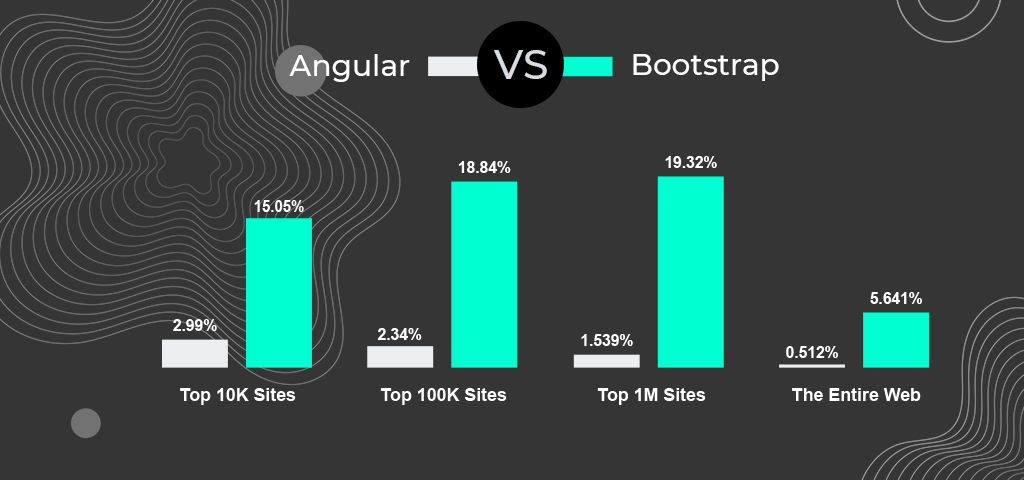
SimilarTech: We can use the data from SimilarTech to compare Bootstrap VS Angular popularity in terms of usage.
Even though Angular is the go-to choice for front-end development, Bootstrap leads the race in every category of websites.
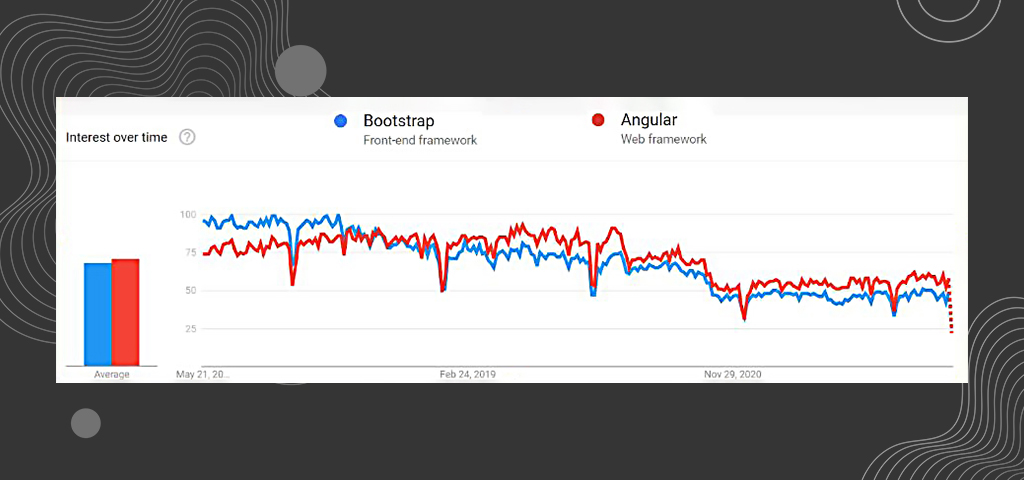
Google Trends: We can use the data from Google Trends to compare Bootstrap VS Angular popularity in terms of which one was most asked about or talked about.
Both Angular and Bootstrap have experienced a gradual drop in their popularity over the years. Even though it indicates that Angular surpassed Bootstrap after 2018, the difference is minimal.
Which one delivers better PERFORMANCE?
Bootstrap is well-known for its user-friendly ease of use when creating websites and web applications, but when it comes to performance, one must be cautious. The framework has been chastised by developers for its large library and underutilized resources, which results in sluggish performance. However, they overlook the fact that it also has comprehensive customization capabilities to boost the app’s performance, regardless of how content-heavy it is.
When it comes to high-performance frameworks, Angular has shown to be an excellent choice. Ivy renderer, a reworking of Angular’s rendering engine, is used to power the framework. It promises to make apps incredibly fast and compact for unrivaled performance, as well as compile components that cut development time in half.
Which one has better ARCHITECTURE?
Because it is developed with two components – the Logic Layer and the View Layer – Bootstrap’s architecture may be characterized as a View-View-Controller architecture. The views component concentrates on the visual displays, whereas the view controller specifies the behavior of all visual components inside the framework. The view layer contains six modules, while the logic layer has twelve components that each provide distinct functionality to a visual aid.
The Model-View-Controller architectural pattern in the Angular framework effectively isolates the application logic from the user interface layer and facilitates the separation of responsibilities. The architecture also aids in the organization of code components based on design and performance differences. The combination of the MVC approach and two-way data binding streamlines the development structure.
Which one is more SCALABLE?
Bootstrap is a mobile-first development framework that can be used to create scalable websites and apps. Bootstrap allows responsive website content to be scaled up or down based on the user’s browser, application, or screen. The framework’s single universal codes also eliminate cross-browser flaws and compatibility difficulties, making it more appealing to developers.
Angular is a full framework capable of creating enterprise-level apps, with ongoing support from Google and other well-known companies. The framework’s scalability is due to its robust feature designs and command-line interface.
Which one is more SECURE?
Frontend frameworks are notorious for including security flaws, and Bootstrap is no exception. The data-target attribute is primarily vulnerable to XSS vulnerabilities, and developers have reported this concern even in upgraded versions. The tooltip or popover data-temple attribute, affix configuration target property, tooltip data-viewport attribute, data container property of the tooltip, data-target attribute, and data-target property of scroll spy are all potential vulnerabilities.
User-created websites necessitate a high level of security and administration. One of the major vulnerabilities that the client-side platform must be protected against is cross-site scripting. Some built-in features in the Angular framework can help to prevent these assaults.
Which one delivers a better USER EXPERIENCE?
Twitter Bootstrap is a web-responsive frontend framework that was created to provide a consistent and optimal user experience. The responsive design of the framework provides online users, developers, and viewers with uniformity across all platforms, increasing the application’s confidence and value.
The Angular framework has established itself as a key frontend framework for creating user interfaces and handling the front end independently. The framework manages user interaction through templates since it is organized into components, classes, and segmentations for a clean code design. The framework controls how data is shown to consumers in a sophisticated fashion. Furthermore, the library store is in charge of reactivity, whereas asynchronous programming is in charge of making the app responsive to users and their actions.
Which one is easier for TESTING?
While there are no native components for conducting tests in Bootstrap, additional plugins and appropriate tools can be used to test apps and sites built with the framework. Because of its single reusable coding component that does not require any repetition, the framework has the advantage of eliminating cross-browser bugs.
Testing is an important aspect of the Angular framework, and any JavaScript code must pass a set of tests. The ease of testing allows us to start from scratch and test all of the components at the same time.
Final Thoughts
You need to consider many aspects for choosing a development technology for your next project. Between Bootstrap VS Angular, deciding the winner is almost impossible as they both have unique advantages and disadvantages.
Is Bootstrap better than Angular?
Angular is a powerful frontend framework with a two-way binding structure, ideal for building dynamic user interfaces. And Bootstrap provides unmatched compatibility across different platforms, screen sizes, and browsers, perfect for building high-end web applications. You need to identify and define your project needs to finalize a frontend technology for your website or web application.
There’s an app for everything these days. And more than anything else, consumers are demanding more accessibility and fewer clicks to purchase a product or service. Every business owner must understand the importance of having a mobile app in this mobile-first era.
The cost of app development has always been a subject of discussion and debate, and 2023 will be no different. With the increasing demand for mobile apps and the rise of new technologies, the cost of app development is likely to continue to evolve. In this blog post, we’ll discuss some of the factors that can influence the cost of app development in 2023 and provide some guidance on how to estimate the cost of your project.
Factors that influence the cost of app development in 2023
1- Complexity
2-Platform
3-Team size and location
4-Features
5-Market conditions
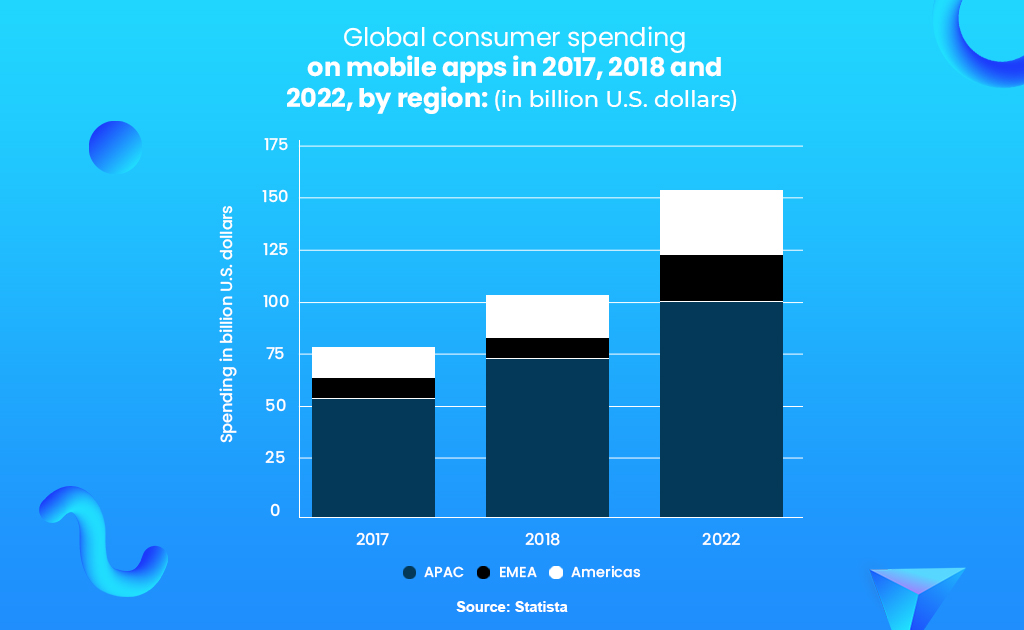
This is enough to emphasize the rapidly growing significance of mobile apps.
But How much does it cost to make an app? App development costs cannot be determined in one go, you have to define what type of app you need and consider what problems you want to solve with your mobile app.
Here’s a detailed app development cost estimation article created by our app development consultants.
How Much Does it Cost to Make an App for your Business?
App Development Cost Estimation
The cost of building an app can range anywhere between $10,000 to $600,000 or maybe even more. The estimation depends on different factors like the type of app, features, complexities, etc. Let’s start with a basic cost estimation:
App Type
Cost
Timeline
Simple
$10,000 – $60,000
2-3 Months
Moderately Complex
$60,000 – $600,000
3-6 Months
Advanced
$600,000 +
6-12 Months
Simple Mobile App:
Made with minimal screens and basic features like user log in, signup, notifications, necessary UI elements, backend support, and no API integrations.
Moderately Complex App:
Consists of 5-15 screens with features like custom UI/UX elements, API integration, in-built payment gateways, and so on.
Advanced App:
Made with 15+ screens and advanced features like media streaming, multilingual support, high-security maintenance, advanced animations, database integration, real-time synchronization, etc.
To correctly answer the question “How much does it cost to make an app?” we need a deeper analysis of necessary and advanced mobile app features…
Deep-Dive Analysis of the Complexity of features and how it affects your app development cost:
The number of features to be incorporated in your app is crucial in estimating a more realistic app development cost because it will have the most significant impact on the development hours.
Also, more complicated features take longer to develop than basic functions, raising the overall app development cost. As a result, the effective formula will be as follows:
App development cost = Hourly rate X (Features X Development time)
BASIC FEATURES:
Login and Signup
Login & Signup impacts how an app is customized based on the user’s information. Users can be given login credentials via email or phone, but many people prefer to use social media accounts like Facebook or Twitter. This feature’s basic implementation will take 20+ hours. The hours and expense of integrating social login or custom-built login/registration will increase. Furthermore, maintaining the data of logged-in users will necessitate a new set of maintenance and security capabilities.
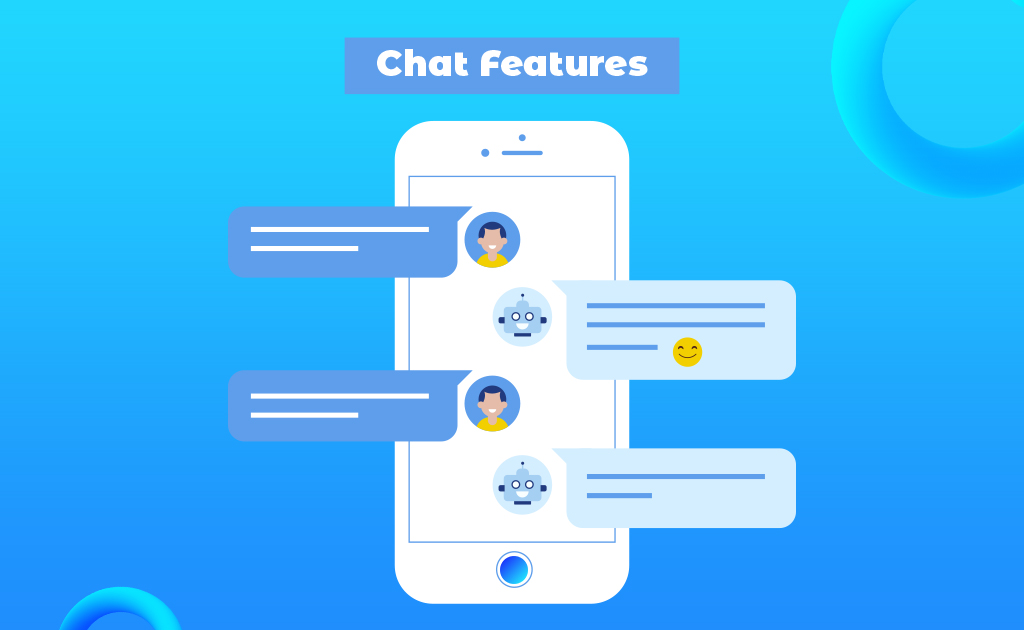
Chat Features
In-app chat has become a standard feature in today’s apps. Depending on the features you want to include, developing a P2P conversation will take 50+ hours. File transfer, message saving or auto-deleting, history, offline mode, notifications, emojis, and more features are included. Group chat may take an additional 80+ hours. Integrating off-the-shelf chat SDKs is more popular these days. While it can increase prices, consider how much it would cost to design a dedicated chat module.
UI Navigation
App navigation is defined by how the users interact with the user interface. Switching screens, swiping, scrolling, buttons, menus and icons are all part of the UI architecture. It takes 10+ hours to create, but adding customizations such as allowing users to change language, switch from list to file view, or go full width will take even more time. In addition, adding landscape mode will add 20 hours to the development time, raising the cost.
Push Notification
Push notifications are essential in today’s apps for engaging users and providing real-time updates. The most basic form can be created in 15 hours or less, but adding photos or action buttons to the notifications may take longer.
Furthermore, adding the logic for when to send notifications can add up to 200 hours of development time.
COMPLEX FEATURES:
Geolocation
Food delivery, transportation, travel, dating, business apps, and identifying user devices all require geolocation for navigation. It takes advantage of GPS and real-time permissions from users. Implementation can take anything from 32 to 50 hours. Additionally, integrating Google Maps can take up to 20 hours.
Payment Gateway Integration
If customers want to buy something in an app, payment capability is required. Many in-app payment methods, such as Paypal, Apple Pay, Google Wallet, and credit cards, are available and can be easily incorporated via payment gateway APIs. This operation can take 50 hours or more, depending on where the data is stored, the amount of PCI compliance, and other variables. Subscriptions or premium services can be purchased in-app and require roughly 30 hours to complete.
Analytics
Analyzing user behavior can reveal useful information about app performance or difficulties that can be used to improve the app. It takes 5+ hours to implement the simplest form of an analytical tool. It works with Google Analytics, Flurry, and other services. Furthermore, the price of these services can rise based on how many user behaviors you wish to monitor.
Media Streaming
This functionality is difficult to create and is common in on-demand programs like Netflix and Hulu. The file format, app logic, processing, server setup, and other factors will all influence the time and cost of development. It can take upwards of 90 hours to develop.
Data Encryption
Every app requires a high level of security to protect private data and prevent unauthorized access. The development of a data encryption feature takes at least 20 hours. Whether the encrypted data is video, image, text, or audio affects the time and cost.
Offline Mode
For data access and storage, the offline mode necessitates the use of a local database on the device. SQLite is commonly used by developers to store data on the device in a single file. This feature takes 30+ hours to develop, depending on the amount of storage and data.
Multilingual Support
If your software serves consumers from multiple nations, it should support multiple languages. Adding many languages to a project will slow down development and increase costs. However, it has the potential to expand user involvement. The fee is determined by how many language translations you wish to include in your application. It also depends on the extent of data and UI modifications.
Connectivity
Hardware features are frequently required by apps to enable interoperability with the device’s built-in functions. Video calls, Bluetooth, sensors, NFC, and other technologies may be required by an app. Adding these features will involve more development time, which will raise expenses.
Pro-tip to save money on your app development costs: If your budget is restricted, you can select features to meet your budget and then improve after launch based on user feedback. Additionally, certain unanticipated modifications in the project’s scope may occur throughout development. As a result, it’s best to start with the most important elements you wish to incorporate.
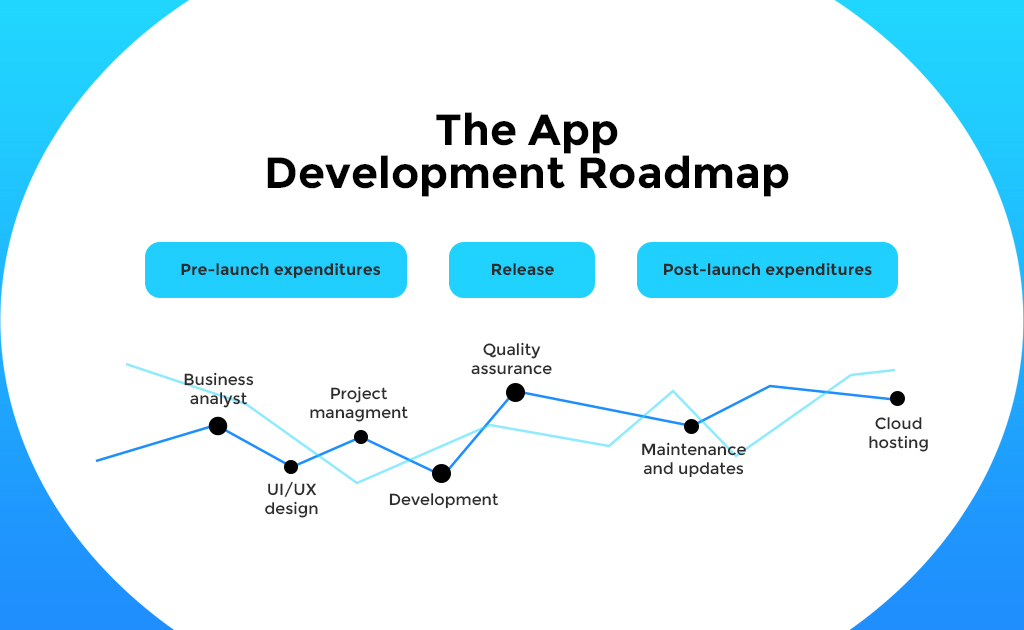
An app development team comprises
Business Analyst
UI/UX Designers
iOS/Android Developers
Quality Assurance Specialists
DevOps
Project Manager
Whether you decide to hire an in-house team, freelancers or a full-service app development agency, the app development costs will differ in each option.
But one thing is for sure, you need such a complete team to successfully plan and implement an app development process.
Hiring In-House Team provides more control over the project but requires a time-consuming screening process along with additional costs for regular salaries, healthcare, vacation days, etc.
Hiring Freelancers is a pocket-friendly option but you won’t get all the resources needed for developing an app.
Hiring from a full-service agency offers end-to-end solutions with a comprehensive mobile app team. Also, you get flexible payment options- hourly or project-based.
Last but not least, always allocate 15-20% of the total app development costs for ongoing maintenance and support. The cost of adding new features, versions, updates, and bug fixes is always a significant part of the total budget estimation.
How can Communication Crafts help with App Development?
With 18+ years of hands-on experience, we understand that developing an app is a highly complex project. Communication Crafts offers a complete package for developing ground-breaking mobile apps with a time-tested process and hand-picked app makers.
Choose from a pool of rigorously vetted mobile app developers for hire and get your app built remotely through seamless collaboration.
Results speak louder than promises:
View case studies
Think to Write: Significantly improved handwriting skills for children in 200+ schools.
BibleForce: Transformed a world-famous illustrated bible into an intuitive mobile app.
Succeedin: Improved physical education experience for students & teachers with an eLearning app.
Parcel Direct: Improved business efficiency and customer satisfaction with a seamless app experience.
Frequently Asked Questions
1. How much does it cost to make an app?
The estimation of app development costs boils down to your needs and the demands of your end consumers. Determine the features you need in your mobile app to solve the pain points of the target audience. Some of the basic features include login & signup, chat, navigation, push notifications, and so on. And some of the complex features include geolocation, payment gateway integration, analytics, media streaming, and more.
2. What are some of the most downloaded apps?
Here are some of the most popular apps in the world according to Forbes:
TikTok: 656 million
Instagram: 545 million
Facebook: 416 million
WhatsApp: 395 million
Telegram: 329 million
Snapchat: 327 million
Zoom: 300 million
Messenger: 268 million
CapCut: 255 million
Spotify: 203 million
3. Which industries must have a mobile app?
In this mobile-first era, almost every industry requires a mobile app to streamline business processes, improve brand visibility and engage with the audience. Here are the top 5 industries that must have a mobile app:
Retail
Travel
Shipping
Banking
Healthcare
4. Does my business need a mobile app?
In order to answer this question, you need to ask yourself the following questions:
Do you have a target audience that embraces mobile?
What unique value would a mobile app provide for your business and its audience?
What are your competitors doing? Do they have an app?
Do you sell products or services online?
Can you support a mobile app in the long run with regular maintenance and updates?
Looking for app developers to build impactful and intuitive mobile applications?
React VS Bootstrap is a long-standing debate in frontend development.
Frontend development is the driving force behind consistent customer retention and brand loyalty.
User Experiences rule the digital-first era.
Your website or web application fails to drive traffic and conversions without a seamless and appealing UI. The look and feel of your web platform determine the first impression of your brand.
Frontend development is the driving force behind consistent customer retention and brand loyalty.
ReactJS and Bootstrap are two of the most popular frontend technologies across the globe.
But which frontend technology aligns with your project needs?
And what is the difference between ReactJS and Bootstrap?
Before we begin with the comparison between React VS Bootstrap, let’s go through the definitions and overview to get a better idea about React and Bootstrap.
Bootstrap
A Frontend Framework with Unmatched Compatibility.
Initially released in 2011, Bootstrap was developed at the Twitter HQ by Jacob Thornton and Mark Otto with the purpose of using this technology as a standardized framework for Twitter employees.
This is an open-source and free CSS frontend framework that is used to build highly responsive mobile-first websites. Maintained by a small team of developers at GitHub, Bootstrap offers a wide range of design templates that include buttons, navigation, typography, forms and other interface elements based on HTML, CSS and JavaScript.
Use Cases of Bootstrap:
eCommerce Websites
Social Media Applications
Video Streaming Applications
Geo-Location Applications
Responsive Web Applications
And more…
Popular Companies that use Bootstrap:
Vogue
Apple Maps Connect
Reuters
Snapchat
Lyft
React
A JavaScript Library with Top-Notch Performance.
Initially released in 2013, ReactJS was developed by Jordan Walke, a software engineer formerly at Meta, with a single focus on creating components for web applications.
ReactJS is an open-source and free JavaScript-based frontend library for developing different UI elements. Maintained by Meta and individual developers, ReactJS offers flexibility for developers with reusable custom UI components, facilitating rapid development of search engine-friendly web pages that render quickly.
Before we begin, let’s talk clear the confusion about React-Bootstrap.
React-Bootstrap Frontend Framework – Best of both worlds!
Is Bootstrap and React-Bootstrap the same?
Yes and no, The re-creation of Bootstrap components using React is known as the React-Bootstrap framework. The slate has been wiped clean and true React components have been built from the ground, eliminating unnecessary dependencies like jQuery.
Can Bootstrap be used with React?
Indeed! With Bootstrap at its core, React-Bootstrap aims to create the world’s largest UI ecosystem. Each component in React-Bootstrap has been created and implemented with a complete focus on accessibility.
How popular is React Bootstrap?
The blend of Bootstrap themes and React components is loved by developers across the globe. Currently, React-Bootstrap has 20.7k stars and 3.3k forks on GitHub and over 900k weekly downloads on NPM.
Difference between ReactJS and Bootstrap- 6 Major Factors
Popularity
Performance
Architecture
Security
Scalability
User Experience
Bootstrap VS React: Popularity
GitHub: We can use this data to compare React VS Bootstrap popularity in terms of community support.
Bootstrap
React
Forks
76.6k
38.5k
Stars
157k
187k
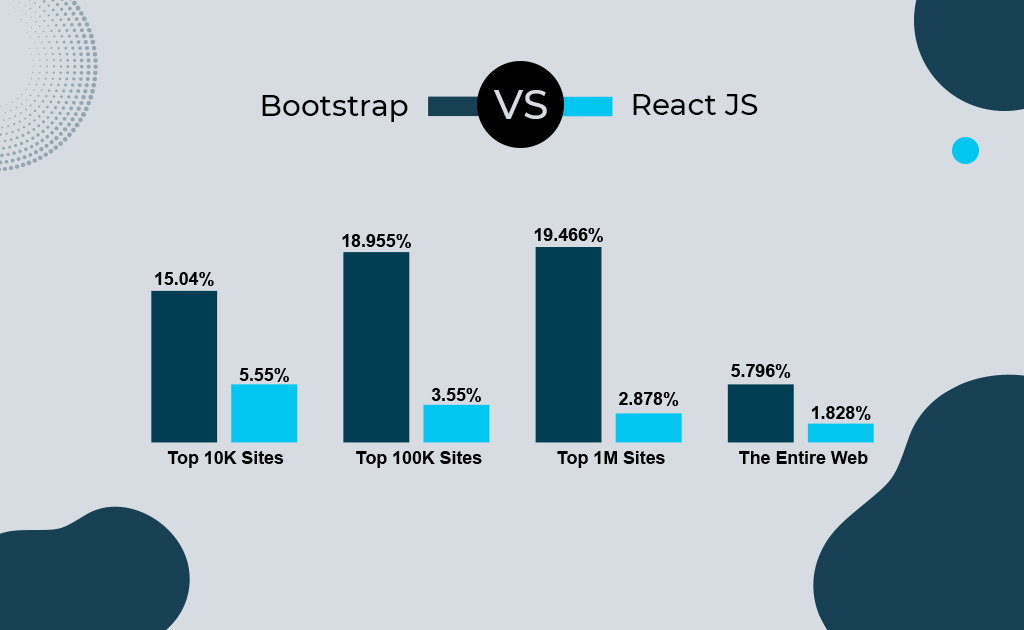
SimilarTech: We can use this data to compare React VS Bootstrap popularity in terms of usage.
Even though React is one of the most adored JavaScript libraries, Bootstrap leads this race in every website category.
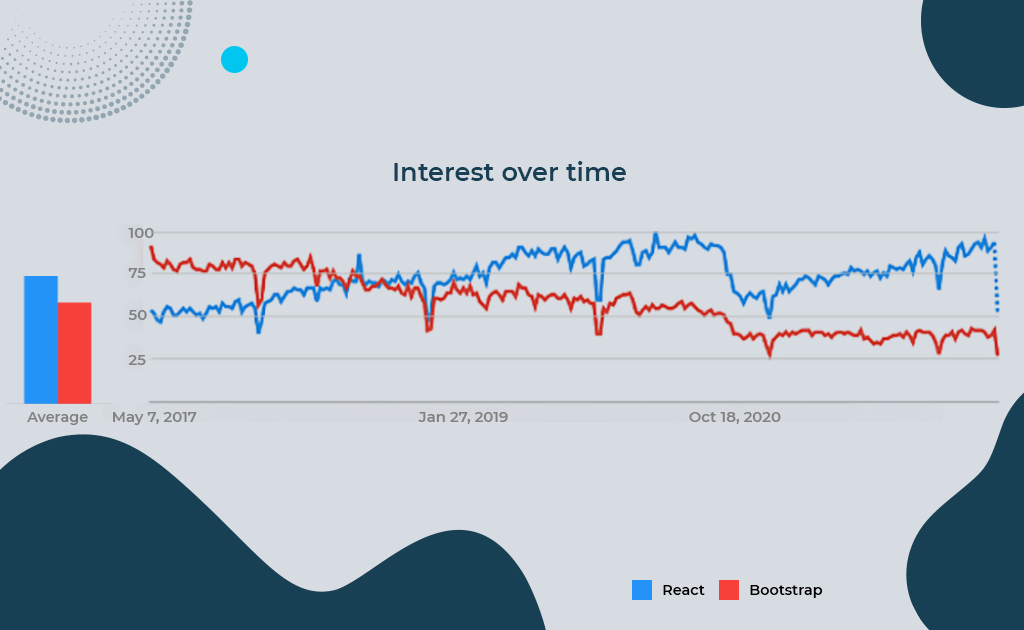
Google Trends: We can use this data to compare React VS Bootstrap popularity in terms of which one was most asked about or talked about.
Bootstrap experienced a drop in its popularity after 2018, while React maintained its prominence over the years.
Bootstrap VS React: Performance
When comparing two development technologies like React VS Bootstrap, performance is one of the most important factors.
Bootstrap
The performance tends to be slower due to the unused resources and vast library, but there are many workarounds. Utilizing extensive customization, only essential resources, minimal JavaScript and CSS codes, CDN and image compression are some of the best practices to improve the performance of Bootstrap websites.
ReactJS
Component-based architecture, reusable codes, and minimal DOM manipulation deliver rapid and seamless website performance. Eliminates the need to reload entire web pages while modifying data or elements. The best way to develop using React is to follow the Don’t Repeat Yourself (DRY) principle.
Bootstrap VS React: Architecture
Another significant factor when comparing React VS Bootstrap includes the simplicity and flexibility of the application architecture.
Bootstrap
This framework comprises 2 components- The view Layer and Logic Layer, constituting the View-View-Controller (VVC) architecture. Also, it is noteworthy that Bootstrap acts as the View component of the MVC design while developing a web application.
ReactJS
This JavaScript library does not need a defined architecture design. React components are used to build the View layer of a web application. You can create small-scale websites easily, but React relies on external libraries like Flux, Reflux, Redux, MobX, etc. for developing complex applications.
Bootstrap VS React: Security
Cybercrime has caused $6 Trillion worth of damage in 2022. The development technologies used in a website are responsible for its security. Here’s a comparison between React VS Bootstrap in terms of security features.
Bootstrap
Security weaknesses are common when it comes to frontend frameworks, and Bootstrap is no exception. This frontend framework is primarily susceptible to XSS vulnerabilities. Developers can use a new JavaScript sanitizer, audit and update security reporting workflows and utilise a content security policy to mitigate such security vulnerabilities.
ReactJS
This JavaScript library is also vulnerable to cyber threats like XSS vulnerabilities, SQL injections, server-side rendering attacks and so on. Mitigating such cybersecurity risks entirely depends on the developer, using techniques like protection against insecure links, utilising script-injection flaws, exploiting serialized JavaScript modules, etc.
Bootstrap VS React: Scalability
You can’t be stuck with the same size of website or web application. You need development technology that helps you scale your digital platform alongside your business. Let’s check out the difference between ReactJS and Bootstrap in terms of scalability.
Bootstrap
This mobile-first framework offers an interactive grid system and a single universal code that eliminates cross-browser glitches and facilitates maximum compatibility across different screen sizes and platforms. Bootstrap websites can be easily scaled up or down according to the screen, application or browser being used.
ReactJS
Through the use of a virtual DOM and reusable components, ReactJS is one of the best libraries to develop scalable user interfaces. It is the developer’s responsibility to make the website more scalable by managing the code efficiently.
Bootstrap VS React: User Experience
Users always gravitate toward a website that offers an amazing user experience, and that’s why front-end technologies like ReactJS and Bootstrap are vitally important.
Bootstrap
The in-built templates, drop-down menus, sliders, buttons, plug-ins, themes and many other engaging elements in Bootstrap deliver a user experience that is seamless and consistent throughout the web application.
ReactJS
With UI elements like forms, buttons, text boxes and more, ReactJS delivers a rich, clean and well-constructed user interface. Due to its fast rendering, the data gets displayed seamlessly and due to continuous updates by Meta, the overall library keeps improving.
Virtual DOM Reusable Codes & Components High Performance SEO-Friendly Structure Large Community Support
Responsive Design Rapid Development Speed Styling Components Unmatched Compatibility Strong Community Support
11
Cons
Constant Updates Entire Focus on View Layer Complexity of JSX Syntax Insufficient Documentation
Limited Templates Steep Learning Curve Unused JavaScript Resources Not ideal for simple websites
12
Use Cases
Progressive Web Applications (with Ionic) Video Streaming Applications SaaS-based Tools Media Websites JAMStack Websites (with GatsbyJS)
eCommerce Websites Social Media Applications Video Streaming Applications Geo-Location Applications Responsive Web Applications
Final Thoughts
Choosing a development technology for your next project includes many aspects to consider. Between React VS Bootstrap, there can never be a clear winner because both frontend technologies have many advantages and disadvantages.
Is Bootstrap better than React?
ReactJS offers high performance with a component-based structure, ideal for building simple and small-scale user interfaces. And Bootstrap provides unmatched compatibility across multiple screen sizes, platforms and browsers, perfect for building elaborate web applications. You need to define your web development needs to identify the best-suited front-end technology for your next project. Still confused?
We also offer rigorously vetted web developers for hire within 48 hours- Get in touch and hire remote dedicated developers from a wide pool of top-tier talent.
Building an eCommerce website? HOLD UP!There are a lot of costs that you need to consider first.
An eCommerce website is a multifaceted platform. That’s why it is impossible to determine the eCommerce website price without considering various aspects that go with it. For instance, design, functionalities, marketing, maintenance, every facet has a pricing of its own.
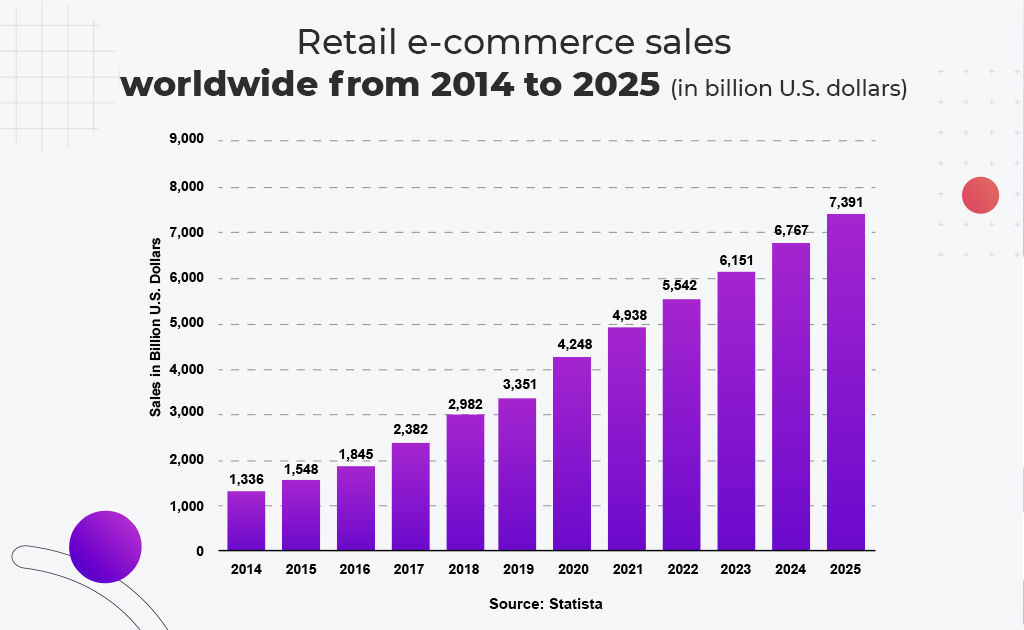
It has become an absolute necessity to have an online store for any retail business in 2022.
Building an eCommerce Website- What type and size?
If you look around the internet, you’ll find that there are countless types and sizes of eCommerce businesses. There are businesses that sell only a handful of products and there are businesses that sell a huge collection of products and services. Different business owners employ different strategies and methods of building an eCommerce website according to the scale of their business.
But how much does it cost to build a professional eCommerce website?
Before getting into cost estimation, you need to figure out where your business stands in this industry.
Do you run a start-up with a limited budget?
Do you run an enterprise with no financial limitations?
Do you run a mid-range company that is looking to scale up?
The eCommerce website cost cannot be estimated in one go, it encompasses many aspects like different development platforms, add-ons, tools, additional features, etc. that you may need to achieve success in your eCommerce business.
Analyze your business and get a clear idea about your financial situation before making any concrete decisions.
eCommerce Website Cost Breakdown
Check out this insightful table to get an approximate estimation of eCommerce website costs:
eCommerce Website Pricing Factors
Small Business
Mid-range Business
Enterprise Organization
1
Website design
< $1,000
$1,000-$5,000
$10,000-$80,000
2
Functionalities
< $2,000
$5,000-$12,000
$20,000-$100,000
3
3rd part integrations
$500
$5,000
$15,000
4
Data imports
$0
$5,000
$10,000
5
Fulfillment
$0
$30-$400
$5,000
6
Content management system
$2,500
$10,000
$25,000
7
Hosting
$500/year
$6,000/year
$10,000/year
8
Maintenance
$3,000/year
$12,000/year
$30,000/year
9
SEO
$10,000/year
$30,000/year
$60,000/year
10
Marketing
$0-$500
$500-$1,250
$3,600-$12,000
Among many other facets, functionality is an aspect where you have some freedom to reduce costs by choosing to use SaaS-based eCommerce development platforms like Shopify, WooCommerce, BigCommerce, Wix, Magento and many more.
These ready-made platforms help you save a lot of time, effort and money, but each platform has its limitations. On the flip side, custom development avails maximum freedom and flexibility, allowing you to create a bespoke eCommerce website that reflects your brand’s personality and resonates with your audience perfectly.
Let’s dive deeper and understand the different costs of building an eCommerce website…
eCommerce Website Design Costs
Estimation: $1,000-$80,000*
“We see our customers as invited guests to a party, and we are the hosts. It’s our job every day to make every important aspect of the customer experience a little bit better.”
— Jeff Bezos
The average attention span of humans is 8 seconds, which is less than a goldfish. Also, there are 12million-24million eCommerce websites across the globe, that’s why online shoppers keep bouncing from one site to another.
The UI/UX design of your eCommerce website is one of the most important selling points of your brand.
What’s the first thing you do when someone suggests a brand?
Check the website, right?
In this competitive digital era, the look and feel of your online store are responsible for the first impression of your brand.
When considering eCommerce website design costs, there are 4 types-
– Simple websites
This type of website looks exactly the way it sounds, simple and straightforward.
Moderately stylized websites
It costs a little more, but you get the freedom to add more graphical elements.
High-end websites
Represent your brand with a more distinct and professional look.
World-class websites
Stand out from the competition by adding interactive graphic elements, high-resolution multimedia content, and a plethora of intuitive features.
If you want to deliver flawless online retail experiences, world-class or high-end websites are the way to go. But simple and moderately stylized websites are also enough to get the job done adequately.
If you’re running on a shoestring budget, leveraging the SaaS eCommerce development platforms is also a great choice. Platforms like WooCommerce and Shopify feature many beautiful themes for free, but they limit your brand’s potential substantially.
Let’s move on and understand the eCommerce website costs in terms of functionalities.
eCommerce Website Functionality Costs
Estimation: $2,000-$100,000*
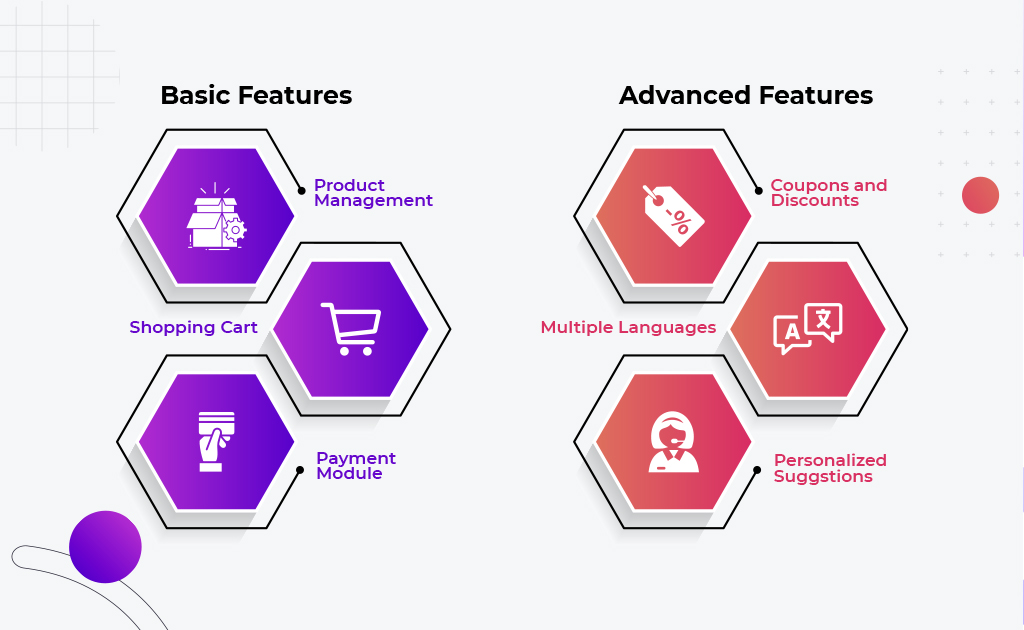
Every eCommerce website, no matter how small or big must have the necessary features. The must-have features that you need to consider for your eCommerce website cost estimation include the following:
Most of these features are available in every online store, but the need for plugins and add-ons rises when you want to integrate advanced features like
Multiple languages,
AI-powered personalized product suggestions,
Virtual product try-on or 3D demos with Augmented Reality,
Abandoned shopping cart recovery,
Wishlist management,
Reporting tools
and so on.
You may go for custom development or choose from any of the SaaS platforms, advanced functionalities always require a bigger budget.
If you’re lost in the options of SaaS eCommerce platforms, check out these articles:
Most importantly, an eCommerce website should facilitate a fast and seamless online retail experience. Adding too many features makes your website slower and it confuses your users instead of solving their problems, subsequently bouncing off potential customers.
A decluttered UI is the key to success in eCommerce.
eCommerce Website Costs: Marketing & SEO
Marketing estimation: $500-$1,200*
SEO estimation: $10,000/year-$60,000/year*
You got your eCommerce website designed and developed, but customers are still not flooding in, why?
“You can’t wait for customers to come to you. You have to figure out where they are, go there and bring them back to your store”
– Paul Graham, Y COMBINATOR
Customers do not automatically gravitate towards a website even if it features advanced functionalities and a world-class design. You need to drive traffic and create a conversion funnel for the target audience. This can be achieved through marketing and SEO activities.
The eCommerce website costs for Marketing and SEO depend on the scale of your online retail business.
As an owner of a start-up or small business, copywriting and SEO can be taken care of without spending a single dime. With some research, you can develop the content strategy for a simple eCommerce website.
As an owner of a mid-range or enterprise-grade business, marketing is a decisive factor for success. Copywriting and SEO aren’t enough, you need to focus on PPC campaigns, social media promotions, blog writing, email marketing, and other digital marketing strategies.
eCommerce Website Costs: Maintenance & Support
Estimation: $3,000/year-$30,000/year*
The sustainability of your eCommerce website can only be achieved through maintenance and support. This is an unavoidable ongoing cost that you plan for the long run, as long as the website exists.
Even after extensive testing, you may find some flaws and bugs after your website goes live. This can be fixed by implementing regular maintenance. This aspect of eCommerce website costs depends on the scale of your website and the method of development.
You don’t need technical support from your end if you’ve created the website through a SaaS-based eCommerce platform. The service provider makes sure your website is updated and bug-free.
If you’ve chosen the path of custom development, regular updates and maintenance are pivotal to keeping your website running at its optimum potential. Enterprise-grade businesses need a customer-support department for valuable feedback, a team of developers to constantly fix and improve the website, and a quality assurance team to oversee the whole operation.
Also, regular updates and a bug-free experience keep your online store competitive in the long run.
eCommerce Website Costs: Fulfilment Service
Estimation: $0-$5,000*
Even the blend of an appealing design, advanced features, regular maintenance, and planned marketing is not enough to succeed in the eCommerce industry. One of the most important facets of online retail is providing flawless services according to the promises made by your brand.
For instance, fulfillment service encompasses elements like on-time product deliveries, standardized product quality, offering seamless customer service, and so on. Delivering on your side of the bargain helps increase customer retention and brand loyalty.
Although this has nothing to do with the elements of your website, we have included a fulfillment service because no eCommerce business can survive without it. That’s why it is important to consider the costs of fulfillment.
Also, your eCommerce website should be completely synchronized with your fulfillment services- updating inventory status, generating invoices, sending out notifications to customers and delivery partners, tracking delivery details, etc.
How can Communication Crafts help in eCommerce Development?
Building an eCommerce website can be a daunting and complicated process.
Don’t fret! Our eCommerce development experts are at your beck and call.
Since 2005, Communication Crafts has been a reliable digital transformation partner for many brands across the globe. Trusted with ISO 27001:2013 certification, we help unlock your brand’s true potential and groom your company for the future.
When it comes to mobile app development, perfection demands time, effort and budget.
App development blunders are common all over the globe, the trick is to effectively evade the deadliest mistakes that can destroy your app.
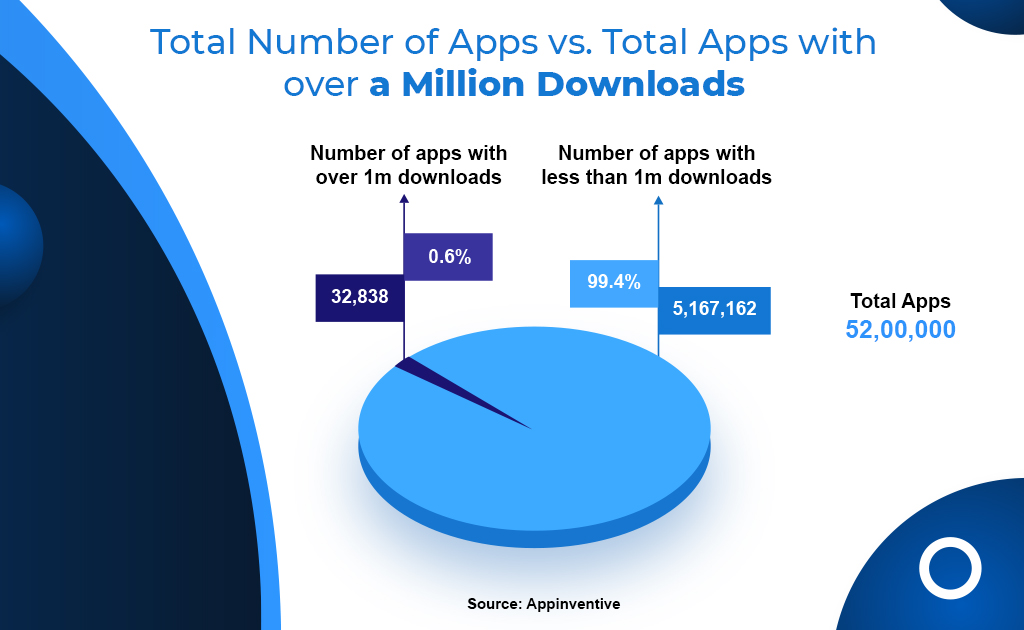
The global number of app downloads will surpass 250 billion in 2022, yet only a mere 0.6% of total apps have reached over 1m downloads.
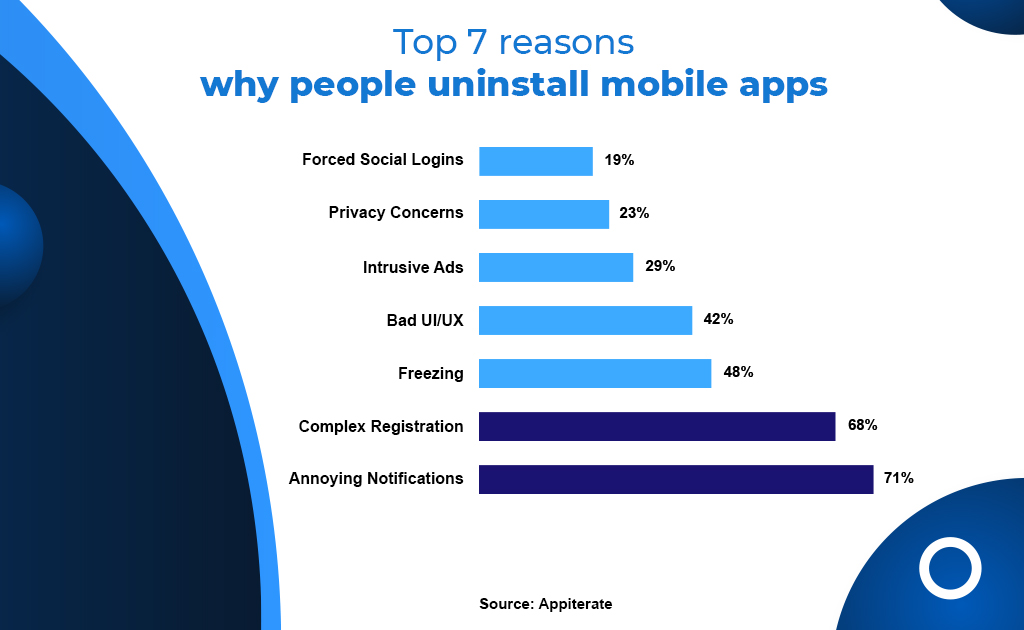
There are many reasons why users uninstall a mobile app and bounce off to one of the many alternatives in this digitally competitive era.
As a leading app development agency in London, we know the impact of such app development mistakes. That’s why our experts have compiled the top 7 mistakes to avoid while developing an app.
This article digs deeper and answers the following:
What are the challenges of developing an app?
What should be avoided when developing a platform-specific mobile app?
What are some of the mobile app development mistakes to avoid?
What are the top 7 mistakes to avoid while developing an app?
Let’s begin…
Communication Crafts is a trusted App Development Agency in London, UK that offers end-to-end app development solutions as well as rigorously vetted Remote App Developers for Hire. We’re a reliable remote partner that helps you achieve your goals with a potent blend of technology, innovation, and seamless collaboration.
Mobile App Development Mistakes to AVOID
Let’s discuss the top 7 app development mistakes in detail:
MISTAKE-1: Not Identifying the Use-Case for your App
Developing an app without considering the use case is like serving food at a restaurant before receiving the guest’s order. This should be the first step of your app development process. If you don’t take the time to identify the needs and problems of your audience, the vision for your mobile app gets blurry.
Ask yourself- “What problems do my app solve for my users?”
This is one of the app development mistakes that can be solved by simply conducting extensive research and analysis. Explore and understand what your mobile app needs to fulfil. When you’re getting into a project that is going to consume a lot of time and money, it is highly recommended to take it slow.
Does the app offer any products or services?
Is it just for engaging with your audience?
Does it simplify daily businesses operations?
WHAT IS IT FOR?
Answer the aforementioned questions by conducting market research- Firstly, analyse your competitors to find out what they’re doing. Check if your competitors already have a mobile app and the main purpose of it. Secondly, research and survey your target audience. Learn what they’re looking for and identify specific problems that can be solved with a mobile app.
Using precise data and insights as the foundation leads to a mobile app that drives customer acquisition and retention easily. Also, identifying the use of your mobile app helps you create a plan for a unique value proposition.
From research to deployment, follow each step carefully for a successful app development process.
MISTAKE-2: Cluttering your App with Too Many Features
When people think of developing a “feature-rich app”, they often think of overloading the app with as many features as possible, which is one of the biggest mobile app development mistakes.
A “feature-rich app” should be planned, designed and developed in a way that includes just the features needed for fulfilling the app’s purpose. Adding too many features confuses your users instead of solving their problems, subsequently increasing the bounce rate of your app. Moreover, unnecessary features make your app slower and bulkier.
Focussing only on the main features and a few supporting features not only makes your app easier to understand and navigate, but also makes your app more appealing to users.
A decluttered UI is the key to success in mobile app development.
For instance, The only features to prioritize in an eCommerce mobile app would be
Product Browsing
AI-Powered Personalized Suggestions
Shopping Cart Management
Location Detection
Payment Gateways
Order Tracking
Help & Support
These 7 features should be enough to deliver satisfying online retail experiences through your mobile app.
When it comes to mobile apps, consumers love a minimalistic approach.
MISTAKE-3: Choosing an Agency without Adequate Research
Oftentimes, business owners get confused and lost in the jungle of remote developers. This is one of the mobile app development mistakes that leads to wrong decisions and futile expenditures.
The perfect fit for your project is out there, outsourcing app development requires a systematic approach.
Finding the ideal talent or outsourcing agency for your app development goals may seem like a daunting task, but it gets simpler if you make a carefully thought-out checklist for the selection process.
Here are a few questions to consider to avoid this mobile app development mistake and Hire Top App Developers:
Does the agency align with your app development needs and goals?
Does the agency have rich experience in similar projects?
Does the agency have expertise in the latest technologies?
Does the agency exhibit a transparent development process?
Does the agency have creative mobile app UI/UX, designers?
Does the agency have a high rating and positive client reviews on clutch. co?
Does the agency provide utmost confidentiality with NDA agreements?
Does the agency offer end-to-end solutions- design to deployment?
Does the agency have any major accolades or global benchmarks?
Use this checklist of questions to thoroughly understand the outsourcing agencies. Shortlist the ones that align with your project needs and cross out the rest.
MISTAKE-4: Subpar UI/UX Designing
We might get so caught up in the development of an app that we lose sight of how it will be used. Neglecting an app’s user interface is a costly mistake.
42% of users uninstall a mobile app because of a bad UI/UX design.
When someone opens an app, they have certain expectations. Check out the top apps around the world as examples to follow.
All these apps offer easy-to-use navigation, a search option, a beautiful UI design, a clear hierarchy in landing pages, a home button that can be accessed from any part of the app, and many other impressive features.
A bad UI/UX can harm your app’s chances in a variety of ways, including:
The mobile app takes an excessive amount of time to load. The longer it takes for your app pages to load, the more users bounce off your app.
Your UI design is boring and unimaginative. Users will be more likely to stick around if the app design is appealing, uncluttered, and easy to use.
Poor navigation confuses your users, making them click and scroll more times than needed to find what they are looking for.
Other avoidable components of bad UI/UX designing are low-quality content and inessential login pages.
A user-centric design is the most important aspect of successful UI and UX. User feedback is essential for success even after you’ve designed and implemented a UX design for the app.
The most common customer preference isn’t usually the most technically sound solution. In the end, the objective should always be to maintain a profit-oriented balance.
MISTAKE-5: Faulty Budget Estimation Before Development
One of the most common mobile app development mistakes that every business owner has to deal with- Going over budget. There have been a few major causes behind this:
Erroneous budget estimation
Improper phase-wise budget planning
Unexpected expenses & hidden costs
Overcome this app development mistake by creating an expense plan from the very beginning of the app development project. Here are a few tools that you can use to estimate the budget:
Cleveroad
Digitalya
Oozou
Inoxoft
How much to make an app?
You can use these tools to create a rough idea of how much your app may cost, but this is not a complete solution. You need to plan for various unexpected and hidden costs. Without a budget contingency plan, you won’t be able to add more features than you initially planned. For example- Integrating modern technologies like AI, AR and VR are much more expensive than regular app features.
Set a realistic budget estimation by planning the expenses for each phase of development.
You must plan the budget for the long run. The two types of costs that you should plan for post-development: Marketing Costs: Every newly launched mobile app needs paid promotions and content creation for customer acquisition and retention.
Maintenance: The ongoing costs for maintenance and updates are pivotal for the long-term success of a mobile app.
There can’t be a definite way of budget estimation for such a complex and multifaceted process. But the answer becomes a little less blurry with in-depth research and analysis.
MISTAKE-6: Insufficient Communication During Development
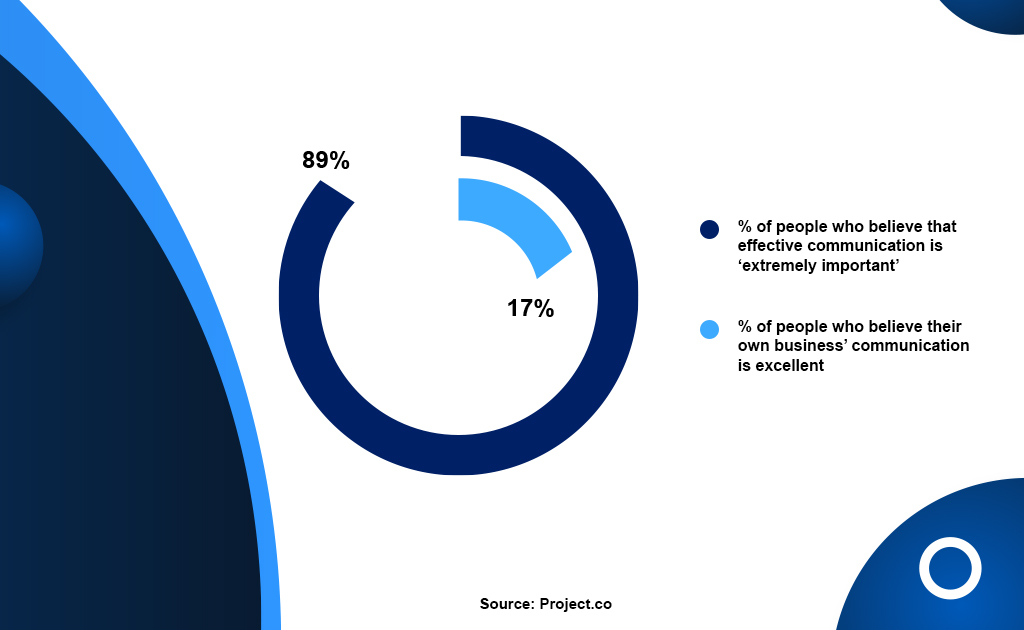
Inefficient communication during the development process is to blame for most mobile app failures.
While most people seem to agree that excellent communication is critical during a project, just a tiny minority of people believe their company is doing so.
This is true for every project, but when it comes to something as complex and vital as mobile app development, the stakes are even higher.
The key to avoiding this blunder is to put communication first from the start. Communication is an essential component of any successful app development project, just as it is in any other business endeavor.
Getting developers to grasp the big picture of your software may seem impossible, but it’s one you must take on.
How well you perform can have a significant impact on the outcomes.
When communicating with developers, the best way is to leave no details unanswered and to avoid making assumptions.
When it comes to a completely new piece of software, full documentation with all of the relevant pictures is essential. Your app’s documentation should include a synopsis (a brief summary of what it does), a detailed feature list, and an app wireframe. In most circumstances, a professional developer will expect you to provide these items.
In exchange, the developer or agency will provide feedback and generate a project price.
During this initial talk, you will gain insight into the developer’s communication method and will be able to determine whether it is ideal for you.
MISTAKE-7: Inadequate Testing After Development
All of your efforts invested in the app- research, designing, coding, go to waste if you deploy the app without proper testing. The app may end up in an endless cycle of improvements or it may stop functioning altogether, damaging your brand’s reputation in the process.
Quality control through rigorous testing is indispensable and still, inadequate testing is one of the most overlooked app development mistakes.
Generally, developers test their apps by getting them checked by another developer. Although it may work well as a peer review, it is still not enough.
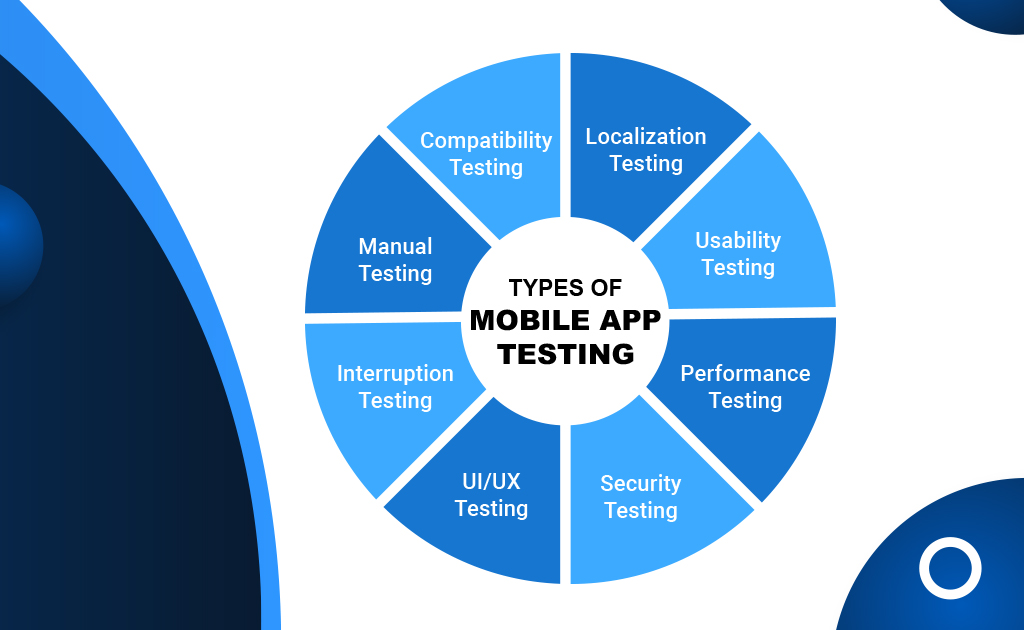
You need a dedicated team of quality assurance and app testers to conduct rigorous testing in multiple aspects of a mobile application:
How to test your mobile app effectively?
Schedule enough time and allot enough budget for app testing
Plan and define your testing procedure
Use templates to create test case documentation
Get the right tools and software to execute testing
Individually test each aspect with a quality assurance team
There are many other strategies for successful testing, and you may form your own strategies as well. But the main objective of app testing should include identifying and eradicating all types of errors/glitches/bugs/vulnerabilities before app deployment.
In this competitive market, it is essential to launch a flawless mobile app to stop users from bouncing off to a competitor’s app.
Your brand’s personality, likability, and reputation are dependent on the quality of your digital platforms. A properly tested bug-free mobile app facilitates positive brand growth, subsequently increasing sales and ROI.
In a nutshell
App development is a burdensome task that takes place over a long period. It is always a possibility that developers can make mistakes along the way, jeopardizing the app’s success.
Some of the top mobile app development mistakes to avoid include a lack of understanding of consumers’ demands, cluttering the app with too many features, inadequate app testing, and many more.
We’ve identified and explored the top 7 mistakes to avoid while developing an app in this article. We hope that this comprehensive list helps to position your mobile app for success.
If you have further questions regarding mobile app development, feel free to contact us.
Communication Crafts offers a wide range of app development services that include mobile commerce development, Android app development, iOS app development, cross-platform app development, UI/UX design, app maintenance/support, and much more.
Get in touch with our highly skilled remote mobile app developers today.
Get the online presence your brand deserves!
Frequently Asked Questions [FAQs]
1. What are the challenges of developing an app?
– Here are some of the most common challenges of developing an app:
Wrong assessing and development approach
Compatibility issues with different platforms
Following standard design & lack of innovation
Insufficient budget to sustain the whole process
Hiring efficient developers from subpar agencies
Issues regarding cybersecurity and data leaks
Lack of resources and platforms
2. What are the most common app development mistakes?
– Here are some of the most common mistakes to avoid while developing an app:
Not Identifying the Use-Case for your App
Cluttering your App with Too Many Features
Choosing an Agency without Adequate Research
Subpar UI/UX Designing
Faulty Budget Estimation Before Development
Insufficient Communication During Development
Inadequate Testing After Development
3. How to avoid app development mistakes?
All of the mobile app development mistakes to avoid can be evaded with good research and strategic development. Study your target audience and learn what they need to define the purpose of your app. Study your competitors and learn what makes their apps unique. Rigorous research will help you get a clear vision for your app, and a systematic phase-by-phase development will help you pay attention to detail throughout the whole process.
Looking for developers to build impactful and intuitive mobile applications?
A business cannot be sustained without a website or web application in this digital age.
Businesses looking to get an edge over their competitors are looking for talented web developers. As a result, few firms can afford to engage a web development team and have a full crew of developers capable of creating and maintaining a website. Many businesses are instead turning to third-party developers to suit their technology requirements.
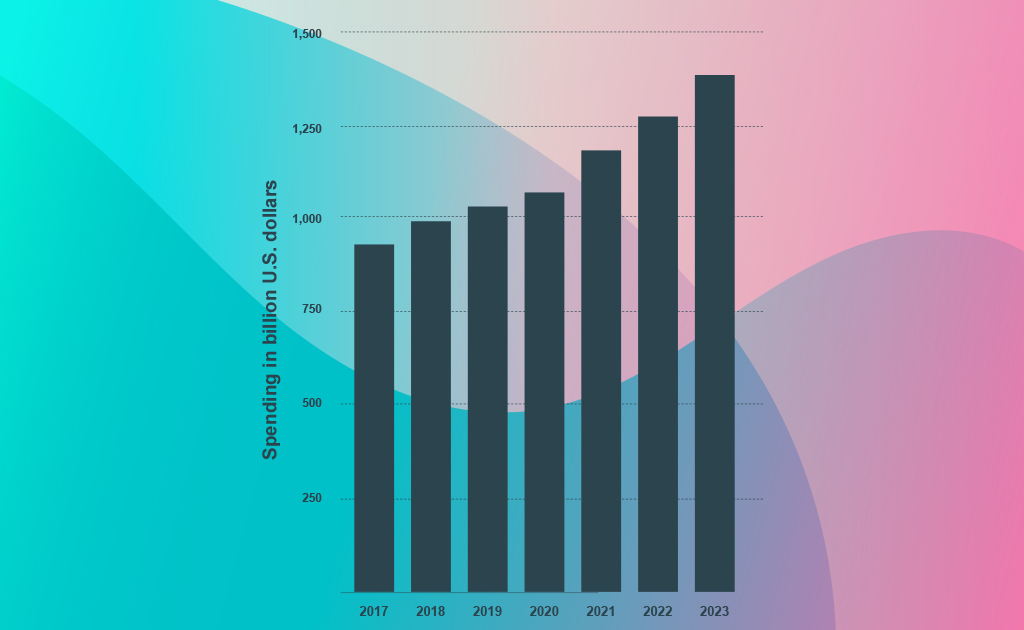
More than $400 billion worth of IT services has been delegated to third-party agencies by the end of 2021.
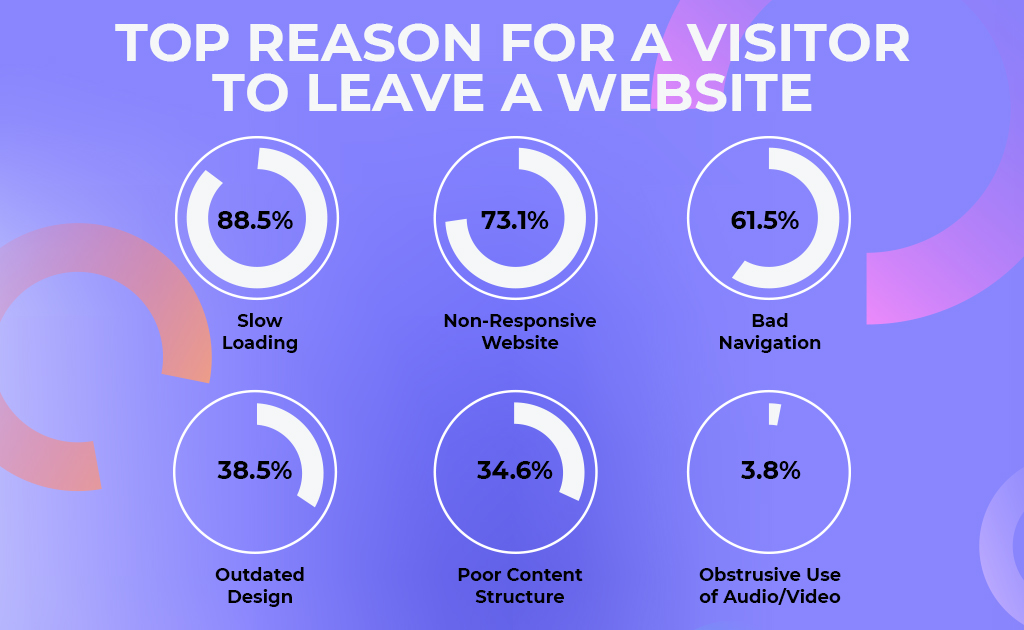
There are many reasons for a user to leave a website and increase the bounce rate:
Source: Hubspot
You need a perfect web development team that understands your objectives and delivers accordingly. Along with technical prowess, you need a team that can create beautiful UI designs to attract potential consumers.
That’s why the expert web developers at CC have collaborated to create this guide on how to hire the perfect web development team.
Before you hire a web development team, an in-house web expert, or a freelancing web expert, make sure that you understand the web development team roles and responsibilities and the results that you can expect. Most importantly, a website development team is in charge of designing and developing websites and web apps for your business.
Web developers must be highly skilled in multiple programming languages and use the latest technologies that help them build site functionality, add different features, strengthen security, and more. Apart from only technical skills, they should ideally have a good sense of time-management and communication abilities. Additionally, they should be detail-oriented with creativity, wit and technical proficiency.
Moreover, knowing about the parts of a web development team is critical for your decision-making process. Here’s a list of what constitutes a successful web development team structure:
Web developers can literally make or break your brand’s website. Knowing what you need is like winning half the battle. It’s crucial to retain your dedicated web development team for long-term sustainability with post-development maintenance, support and scaling.
What Constitutes an Ideal Web Development Team?
Apart from having web development team roles and responsibilities established and delegated to adept professionals, it’s crucial to observe these qualities throughout the process:
Detail-oriented work,
Meticulous code writing & documentation,
Process automation,
Version control,
Effectively use different tools, also including communication tools,
Efficient use of integrated platforms,
Collaborative code reviews.
Furthermore, top-tier web development teams have a strong team culture. They work harmoniously and motivate each other through the process. If you’re searching for the most effective solution and considering outsourcing web development agency, then make sure to observe how individual web developers function in the workplace and take some time to figure out how they coordinate as a whole.
If the members of the web development team get along with each other and display impeccable dynamics in the workplace, then you have found your dream team.
In-House VS. Outsourcing: How to Hire a Web Development Team?
Hiring an in-house team VS outsourcing web development team is always an ongoing struggle, demanding extra money, effort and time.
Two-thirds of all US companies already outsource software development projects. Also, 57% of organizations claim that IT outsourcing lets them focus on their core business activities.
Experts in various fields of software development are in high demand for achieving business success. When the digital era began, external organizations and outsourcing web development teams used to be the game of big corporations and large enterprises. But now, almost 80% of start-ups and small businesses are planning to outsource some roles in 2021.
However, although outsourcing is being widely accepted as a new normal, it still has a few drawbacks. Its main risks and challenges include:
You don’t get complete control over the project;
You can’t monitor the professionals at all times;
Potential confidentiality and data security risks;
Communication issues may occur when you consider different time zones.
But many web development agencies overcome these challenges easily by-
Keeping the client’s needs in priority;
Hiring project managers for performance accountability;
Signing Non-Disclosure Agreements;
Maintaining seamless communication with the client.
So, before selecting this popular and efficient practice, make sure to get familiar with all of the benefits and drawbacks of outsourcing. Then, there is a matter of timing. When is it ideal to outsource? Analyze your business and hiring requirements to make sure that you answer these pivotal questions:
Do you lack specific technical skills and proficiency with some programming languages in-house?
What is your budget?
How much time do you have?
Do you have an in-house team of recruiters?
Your in-house team is incomplete and you need a web app for your core business, then it is ideal to build in-house. But for the rest of the scenarios, outsourcing is the way to go. In this busy digital era, outsourcing a web development team is the best way to fill the technical gap in your company. Identify your problems/challenges, create a plan and make a decision accordingly.
Why Outsource a Web Development Team?
When you finally find the ideal IT outsourcing agency, all your web development challenges seem to fade away. You will identify the countless perks of outsourcing almost instantly. These are some of the advantages to look forward to:
Reducing hiring and operational costs;
From design to deployment, save time in reaching the market;
Scaling project growth more effectively;
Eliminate stressful screening and interviewing processes;
Focus more on core business matters and functions,
Accessing proficient technical skills and rich experience;
Accessing cutting-edge technologies;
Performance accountability with project managers.
lastly, if you choose correctly, it is confirmed that your entire web development team will be more efficient and productive overall. Consequently, the quality of work that you’ll deliver for your clients will improve as well.
For example, if you’re building an EdTech business and require a reliable web development team to assist you, make sure that you conduct enough research on the top web solution providers to hire the ideal one. Identify your needs and select the IT outsourcing agency with a good reputation and relevant experience.
Let’s elaborate…
How to Hire an Ideal Web Development Team?
Let’s answer this much-awaited question – How do I hire a web development team?
Always start an action by analyzing your business from the inside and identifying your actual needs, requirements, and things you’ll be able to offer to prospective candidates and BPO companies,
Research the market and find out what’s available, how your competitors work, what are the vendors like, how much do freelancers charge, what are the costs of outsourcing parts of your project, and beyond…
Always focus on the technical capabilities you require, but never overlook the importance of soft and interpersonal skills, relationships within an outsourced team, core values, assertiveness, punctuality, and other factors.
Begin with smaller, more manageable chunks of work and gradually broaden the scope to familiarise yourself with your new hires.
These are the essentials that must be addressed. Once you’ve done that, the remainder will be rather painless and comfortable.
Identify your business needs
Every website development project is unique. It’s impossible to know which web developers will best suit your demands without first knowing its size and ambitions. So, first and foremost, you must decide the type of project for which you are hiring:
A simple project involving the creation of a simple website or the integration of new features such as a contact form, a call-to-action button, a new template design, and more.
A medium project might be anything from web app development to eCommerce shop creation to services that require the integration of third-party systems like databases, CMS, CRM, APIs, chatbots, and more.
To store user data, large projects like social media apps or social networks necessitate a variety of complex technologies and cloud hosting servers.
Then take advantage of these helpful hints:
Do you wish to start from the ground up with a project?
Do you need to expand your in-house team and get assistance with a current project?
Do you want to employ a technology that no one in your in-house team has worked with before?
It will be simple to choose the ideal technique, business model, and solution after you have a clear understanding of the essential aspects and are familiar with your genuine goals and possibilities.
Conduct research
Regardless of whether you’re looking to find an outsourced web development team or build one yourself, doing thorough research is paramount. If you want to collaborate part-time with a freelancer, you could look into various platforms like Upwork and filter the profiles that match your requirements.
However, if your main question is – How do I hire a web development company? Things are a little more complicated. The search should be more careful. Finding the best outsourcing company should never be rushed, and it should consist of specific steps:
Checking references and reviews,
Looking at previous projects completed by their development teams,
Paying close attention to the user experience when looking at the solutions they’ve built,
Paying attention to the speed of the sites they’ve built,
Comparing their price range to a few other skilled competitors,
Planning your budget.
If you’re not sure where to start, look into sites like Clutch to identify a BPO firm that fits your technical needs, values, and budget. Then, if you’re interested in working with a specific vendor, make an effort to establish open and honest communication.
Focus on hard and soft skills
The front end, back end, and full-stack developers are the types of web developers to look into. What each of them performs is as follows:
Front-end developers work to create or improve the parts of your website that your visitors will interact with. However, their knowledge extends beyond modifying the look and feel of your website. If you want to concentrate on user experience, you need to hire a designer. Front-end developers use HTML, CSS, Javascript, frameworks, and libraries to make website designs completely functional.
Back end developers are in charge of creating or improving the structure of a website. In other words, their expertise will have an impact on how your website functions behind the scenes. You can count on them to improve the speed of your website, integrate third-party services into its architecture, and troubleshoot difficult technological issues. The most common programming languages used by these computer experts are Python, PHP, Ruby, and Java. They’ve worked with relational and non-relational databases before.
Full-stack developers can work on both the front and back ends of a project. They’re common among start-ups looking for quick fixes. Hiring them could also help you save money. Working with an all-around professional is typically more economical than hiring FE and BE developers, despite their higher hourly costs.
Begin your search once you’ve decided on a tech stack and background. Nonetheless, you must focus on non-tech abilities. You’ll find a perfect fit this way, whether it’s an in-house developer, a freelancer, or a BPO firm. Personality traits and a good attitude will aid you in achieving your goals and maintaining a healthy workplace.
Start small and then scale up
If you decide to outsource web development, it’s a good idea to start with a small test project. Even if you don’t want to waste time with a trial, it’s still a good idea to start by allocating a small job to your new group. This will help you to observe how they approach tasks and how they work. You’ll find out how they communicate and how they deal with deadlines.
After that, progressively increase the workload. Before moving on to the main plan, please give them a couple more difficult chores. The various scopes of work will also educate you something about their abilities and methods.
Follow the above tips for an ideal Web Development Team
These straightforward guidelines will assist you in determining where to begin when trying to recruit a web development team. Always double-check your actual business and hiring needs before attempting to get significant market information. It takes time and effort to find a suitable outsourcing firm. Be patient, and never settle for anything less than your actual goals.
Choose a team that will offer fresh ideas, efficiency, talent, and a positive attitude to the job. Their culture and ethics are just as important as their technological prowess.
Communication Crafts- Get your dream web development team
With 17+ years of hands-on experience, Communication Crafts is a trusted agency that offers a wide pool of Remote Web Developers for hire. To provide end-to-end web development solutions under one roof, our devoted experts use a strong blend of technology and innovation. We use cutting-edge technologies like Angular, React, Vue, PHP, Ruby, Python, and others to create high-quality software development solutions for a variety of industries, including banking and finance, food and beverage, eCommerce, health and fitness, entertainment, photography, logistics, and eLearning.
Our web development professionals are skilled at creating websites and web applications that help your company rise above the ever-increasing digital competition. Get top-tier web development from our pre-vetted talent pool, from concept creation to deployment and maintenance.
Why Hire from Communication Crafts?
ISO 27001:2013 Certification
Clutch Rating (4.8/5.0)
17+ Years of Hands-On Experience
150+ Clients across the globe
180+ Expert Developers
Flexible Hiring Models
Cutting-Edge Technologies
The CC Difference:
CC Experts
Freelancers
In-House
Reliability
Extremely Reliable
Unreliable
Moderately Reliable
Scalability
High
None
None
Accountability / Supervision
Dedicated Manager
No Supervision
Extra fee for supervision
Project Delivery
Rapid & Streamlined
Undetermined
Adequate
Security
Airtight Security
No Security
Moderately Secure
Hiring Process
Pre-vetted & Hand-Picked
Hectic & Tedious
Hectic & Tedious
Project Size
Flexible (Any
Small
Fixed
Communication
Seamless
Inefficient
Adequate
If you require further assistance in web development, feel free to contact us!
Physical stores or showrooms are not the faces of the business anymore, websites and mobile applications create the first impression in the digital era. The front end of a website/application determines if the user will stay or leave, impacting your platform’s bounce rate extensively.
Consumers tend to gravitate towards high-functioning and visually appealing front-end UIs. Without a seamless front end, your website/application loses its value and adversely affects your brand image.
This is where front-end developers come into play!
Hiring the best front-end developers can help your business maintain an attractive and engaging online presence.
As you can see from the data, the number of software developers around the globe is almost stagnant but the expenditure on IT development keeps increasing exponentially. That’s why the traditional method of in-house hiring isn’t enough anymore, businesses have to hire web developers via freelancing platforms or outsourcing agencies.
But how to hire a frontend developer in 2022?
As a leading web development agency, our expert web developers have gathered the information needed to hire a frontend developer in this detailed article.
Front-end web development or client-side development is the process of building CSS, HTML and JavaScript for Website or Web Application Development. The front-end developer is responsible for developing the elements of a website or application that the user directly interacts with.
The greatest challenge in the field of frontend development is that the methods, techniques and tools are constantly changing and evolving. That’s why staying updated and consistent improvements are of paramount importance for a frontend developer.
Let’s make it simpler, shall we?
What do you see when you open a website or an app? In most cases, it is the User Interface- the client-side elements of a platform and the flow or interconnection between them, which determines the User Experience. This is what a frontend developer builds!
A frontend developer aims to design a website or an app that provides information and elements in an easy-to-perceive, relevant and engaging. The process of frontend development gets complicated when you consider the accessibility factor. An ideal frontend developer would build a website or mobile app that is compatible and functional across different types of devices, browsers and operating systems.
Types of frontend developers you can have in your arsenal:
Frontend Developer
Frontend Engineer
CSS/HTML Developer
Frontend Web Designer
Frontend UI Developer
Frontend SEO Expert
Frontend Accessibility Expert
Frontend Dev. Ops
Frontend Testing/QA
Now let’s discuss the responsibilities of a Frontend Developer…
What are the Responsibilities of a Frontend Developer?
It is crucial for you to understand the roles and responsibilities before you hire a frontend developer. Our experts have listed some of the critical roles of a frontend developer:
Building engaging and user-oriented experiences using HTML and CSS;
Building personalized elements and features for users that include user interactions, server responses, animation, etc.
Staying up-to-date with the industry trends and advancements;
Writing standard lines of code that can be used for future projects;
Collaborating with web designers and backend developers;
Developing mock-ups and wireframes of website/application design;
Optimize and maintain websites/applications for long-term success;
To suffice, an ideal frontend developer is a blend of creative design and precise programming.
Now let’s move on and discuss the skills of a frontend developer…
What Skills does a Frontend Developer Need?
After understanding the roles and responsibilities, it is important to know the required skills before you hire a frontend developer. Keep an eye out for the following technical skills:
CSS pre-processors- Sass and SCSS
Frontend frameworks- Angular, React, Vue, etc.
Responsive design
XHR requests (AJAX)
jQuery and BackboneJS
Browser developer tools
IDE debugging & testing
CSS frameworks- Foundation, Bootstrap, etc.
Module bundlers- Webpack, Grunt, Gulp, etc.
Git version control system
Content Management Systems (CMS)
Search Engine Optimization (SEO)
Wireframing
JavaScript or CSS animation
Templating strategies and engines
UI widgets
HTML semantics
Web/browser security
Command Line Interface (CLI)
Object-oriented programming
Along with top-tier technical skills, an ideal frontend developer exhibits superior soft skills:
Empathy
Communication
Teamwork
Approachability
Patience
Open-Mindedness
Problem-Solving
Accountability
Creativity
Time Management
Now that you know the required responsibilities and skills of a frontend developer, let’s examine the different options to hire a frontend developer…
How to Hire a Frontend Developer? (Different Options)
There are many ways to hire a frontend developer for web development services– outsourcing agencies with a wide talent pool, freelancing portals with independent frontend developers, and job listings.
Each option has its unique advantages and disadvantages. Understand the following hiring options to yield the best results:
Hiring from Outsourcing Agencies
Hiring Freelancers
Hiring In-House Developers
Let’s discuss this in detail…
Hiring from Outsourcing Agencies
Hiring from full-service outsourcing agencies is, by far, the best option for sustainable and scalable front-end development. This is an effective and modern solution to combat the lack of top-tier talent in the existing market.
How to hire a frontend developer from outsourcing agencies? You choose from a pre-vetted talent pool from any country, and the chosen front-end developer would work for you remotely. You can find the top outsourcing agencies in the following portals:
Clutch
GoodFirms
IT Firms
This is the most time saving and efficient option.
Eliminate the time-consuming screening and interviewing process.
Save expenses in employee perks, induction, sick/vacation days, etc.
Maintain long-term partnership for maintenance and support.
Hire more frontend developers whenever you like to scale your team.
The developer will be supervised by the outsourcing agency at all times.
Top-quality code writing and streamlined project delivery.
CONS
More expensive than hiring freelancers, but definitely worth the cost.
Remotely working employees reside in different time zones, leading to hindered communication at times.
Hiring Freelancing Developers
A pocket-friendly option for short-term projects. This option may seem attractive due to its affordability but bear in mind, this benefit comes with many drawbacks such as lack of communication and inefficient development process.
How to hire a frontend developer from freelancer portals? Conduct extensive research on the available freelancing developers to learn their experience and expertise in frontend development. This screening process is followed by an interview round and then you select the best-suited freelancer for your project. You can search for talented frontend developers in the following portals:
Fiverr
Upwork
Toptal
Let’s look at the pros and cons…
PROS
The most affordable option for hiring developers.
Save costs in employee perks, induction, sick/vacation days, etc.
Ideal for small-scale projects.
Hire whenever you like.
CONS
Low dependability.
Lack of communication due to remote work.
Little to no control over your project.
Unsupervised development process.
Haphazard project deliveries.
Hiring In-House Developers
This is the traditional method of hiring a front-end developer. In this option, you integrate a new loyal employee into your existing team for long-term project sustainability. The hired front-end developer blends into your work environment and actively participates as a member of your workforce.
How to hire a frontend developer as an in-house employee? You conduct research and go through a relentless process of screening and interviewing. In this option, you’re choosing a permanent employee for your company, that’s why you need to choose the best candidate meticulously. Here are some of the top portals to find the best candidates:
Indeed
Glassdoor
LinkedIn
Let’s look at the pros and cons:
PROS
An in-house employee cares about your long-term mission and goals.
In-house developer integrates well with your existing team.
In-house developers will always be at your beck and call.
Seamless communication among team members.
Active collaboration among team members.
CONS
Expensive option over time with monthly salaries and employee perks.
Stressful and time-consuming screening process.
Difficult to find top-tier front-end developers for hire.
Now that you thoroughly understand how to hire a frontend developer, let’s see how Communication Crafts can help in IT outsourcing…
Communication Crafts- Full-Service IT Outsourcing Agency
With 17+ years of hands-on experience, Communication Crafts is a trusted agency that offers a wide pool of Remote Web Developers for hire. Our dedicated developers utilize a potent blend of technology and innovation to provide end-to-end front-end development solutions under one roof. We leverage cutting-edge technologies like Angular, React, and Vue for high-quality software development solutions that span many industries like banking & finance, food & drink, eCommerce, health & fitness, entertainment, photography, logistics, eLearning, and more.
Our front-end experts are adept at building websites and mobile applications that help your business soar above the ever-growing digital competition. From concept creation to responsive design, avail top-tier frontend development from our pre-vetted talent pool.
Why Hire from Communication Crafts?
ISO 27001:2013 Certification
Clutch Rating (4.8/5.0)
17+ Years of Hands-On Experience
150+ Clients across the globe
180+ Expert Developers
Flexible Hiring Models
Cutting-Edge Technologies
If you require further assistance in front-end development, feel free to contact us!
eCommerce is undoubtedly the future of retail, and UX design is a significant part of building a customer-centric eCommerce store.
The digitalization of businesses began in the early 2000s, but the onset of covid-19 has accelerated the demand for online products considerably. Consumer demands and expectations are at an all-time high, and brands have to continuously figure out new and improved ways to serve their online audience.
UX Design is an opportunity to create a long-lasting impression for an eCommerce website. The eCommerce user experience has a direct effect on the website’s bounce rate and consumers’ purchase decisions.
As a leading eCommerce website design company, in this blog, our UX design experts have gathered the essential tips and best practices to build a perfect eCommerce User Experience.
But before that, let’s understand what is UX Design…
The elements of the client-side interface of a website or mobile application constitute the user interface. And User experience defines the actual feel of the platform.
Therefore the UI has a significant impact on user experience, but the UI elements alone don’t define the UX. The interactivity, navigation and functionality of the UI elements determine the quality of UX.
To elucidate in layman terms, UI design is the look of the website or app and UX design defines how it actually works.
Don Norman coined the term “User Experience” and in his words:
“No product is an island. A product is more than a product. It is a cohesive, integrated set of experiences. Think through all of the stages of a product or service – from initial intentions through final reflections, from the first usage to help, service, and maintenance. Make them all work together seamlessly.”
Now let’s take it a step further and discuss the following.
Why is the eCommerce UX Design Crucial for your Business?
Any top-tier eCommerce website development company would know that improving the eCommerce User Experience impacts many parts of your eCommerce ecosystem. The advantages go further than simply increasing sales and revenue.
An enhanced eCommerce user experience provides…
Improved customer service
Reduced customer acquisition cost
Increased word-of-mouth referrals
Enhanced customer satisfaction and retention
Increased brand awareness and recognition
Increased online visibility
And ultimately, increased conversion rate, ROI and an impactful online presence.
What are the eCommerce UX elements?
User Interface
Homepage
Navigation
Search and Catalogs
Filters
Product Page
Signup and Checkout
Accessibility
Tips and Best Practices for eCommerce UX Design
Here are some of the essential tips, tricks and eCommerce best practices to build a high-functioning, revenue grabbing and customer-centric eCommerce website or application:
1. Top-Quality Product Photos & Videos
In an eCommerce store or online shop, consumers don’t have the option to experience the product in real life. That’s why they entirely rely on product photos and videos.
It is vital for modern e-commerce UX design to include photos and videos of the best quality. The better the representation, the more users gravitate towards your online store. This includes high-resolution images, 360-degree views, 3D models, and high-quality videos.
Pixelated or low-quality photos/videos are criticized, the consumers’ overall online retail experience is spoiled and they make your brand seem lazy or careless. Unsatisfactory product representation leads to a high bounce rate, decreasing customer retention and ultimately deteriorating brand image.
Another thing that’s becoming the new norm is the ability to zoom photos. The main idea is to have a satisfactory level of zoom to let users get all the necessary information.
Also, Augmented Reality is making huge strides in improving online product representation. Trying on products is the biggest advantage of offline shopping over online stores, but AR solves this issue. Brands can integrate AR technology to enable their consumers to try on products using their phone cameras.
Example of a high-quality product photo by H&M:
2. Seamless Navigation
Your eCommerce UX design must facilitate seamless and easy navigation throughout your eCommerce website or app. In a physical store, customers have to walk around to browse products, but the major benefit of online stores is that consumers can access a plethora of products just by tapping, clicking or scrolling on a screen.
Every aspect of an eCommerce UX design should be logical and flow from one point to another with ease, facilitating an easy structure and navigation through the pages. For example, simple navigation works like this: homepage – menu — product page — cart — payment and back.
To achieve this, the eCommerce UX designer should develop user journey maps and test various options to choose the best-suited ones.
Some of the impactful UX navigation elements:
The brand logo should lead to the homepage and always stay visible, no matter how further into the website a user goes.
The catalogue helps users switch to the correct category of products and find what they need quickly and precisely.
Breadcrumbs allow users to return to previously selected positions on the website.
Filtering allows excluding undesirable items from massive search results and leads consumers from the homepage to the desired product page.
The search bar lets users quickly find a particular item or category. It should be prominent and accessible at all times.
Clear visual hierarchy further simplifies the user’s journey through your eCommerce website or app.
Also, Artificial Intelligence and Machine Learning can enhance the consumers’ online retail journey through an eCommerce website or app. AI-powered algorithms can help a brand understand their consumer’s behaviour, likes and dislikes to deliver personalized product suggestions and content.
Example of Patek Philippe website with prominent brand logo, search bar, catalogue and visual hierarchy:
3. Consistent Brand Identity
An eCommerce UX design should blend with the products, reflect them, mirror the brand, and exude an authentic feeling for the products. An eCommerce website is a major part of a brand’s identity and it’s a designer’s job to convey the attributes and values they want the products to exhibit.
Consistent brand image and identity across all platforms boost revenue by 23%.
Users remember the branded design. To stand out in the ever-growing digital competition, a unique brand identity is mandatory. The concept of corporate identity includes a brand logo, slogan, corporate fonts, and colours. Top-tier website UX designers use the same colours, fonts and general design patterns throughout the website to make users recognize and remember the brand.
Consistent brand identity on Tesla website:
4. Reviews, Accolades & Achievements
Posting positive reviews, customer testimonials, accolades and awards is an effective way to gain customer confidence. This includes:
Customer reviews
Awards & Accolades
Mentions in the press
Entertaining information about the company
And so on…
There should be balanced content in the UX design. Many companies shower their websites and apps with social evidence, and sometimes consumers scrutinize self-praising content. Consider the crucial and relevant evidence. Conduct research, study competitors, and understand what the audience likes. Add enough social proof to prove your brand’s credibility.
5. Visible & Effective CTAs
An effective CTA should be noticeable, colour contrasted with the rest of the page, and clickable look, a copy should indicate what happens next, and instigate action among consumers.
eCommerce UX designers must provide a sense of urgency in the CTA buttons, and persuade them to take the action but refrain from pushing too hard.
Evoke emotion or enthusiasm with trigger words, use attractive colors, add clever copywriting, and give them a reason to take the required action.
Here’s an example of bad CTA VS good CTA:
6. Customer Support
Customers will be convinced to make a purchase if your eCommerce UX design facilitates seamless customer support.
Add a contact page with an e-mail, a phone number, and a physical store location
Add a phone number or email address on the homepage
Add links to social media handles
Add an FAQ page
Provide live chats
Live chat: This feature enables 24×7 customer support. AI-powered chatbots can answer generic questions instantly and consumers in their online retail journey. Customer support officials can take charge if the query is too complicated for chatbots. The easiest way to help consumers in their purchase decision is by enabling live chats, aiding customers to find and select the right products, and increasing the average check by offering extra services and products.
7. Simplified Checkout Process
Consumers tend to get annoyed by the overly complex checkout process. They like to be informed in the process and have some control over the experience.
Remove the need to register to make a purchase or implement authorization through social networks. Ask for information that is most necessary only. Remove all distractions from the Checkout page.
Display the stage of payment clearly (cart, payment details, review order, receipt, etc.)
Add prominent breadcrumbs to help them navigate back
Add multiple payment gateways and facilitate multiple currency payments
Add gamification elements like a progress bar
With a progress bar, consumers get to know exactly where they are in the process and how long it’ll take to finish. This feature gives them control and provides a smooth checkout flow.
8. Section for Special Offers & Discounts
Many consumers expect heavy discounts and sales when they shop online. Discounted products with time limits can influence even more purchase decisions.
Having a different section just to display discounted products like end-of-season sales can retain existing customers and attract potential ones. This dedicated “discount” section also converts first-time buyers into loyal customers because they expect to see discounted products on your eCommerce shop.
Providing coupon codes for the next purchase in the sale section also leads to return customers because users tend to come back before the coupon expires.
Final Thoughts
eCommerce is here to stay, and that is certain. Businesses will have to evolve and cater to a new segment of audience- online consumers.
The demands of online consumerism are even more volatile than offline shoppers. Brands have to create and deliver impeccable online retail experiences to stay competitive in this ever-increasing digital competition.
From high-quality product photos to effective CTAs, there are many factors to consider when building an impactful eCommerce user experience.
We hope this guide has helped you understand what needs to be done to deliver a perfect eCommerce user experience.
If you have further queries or if you require further assistance with eCommerce development, feel free to contact us.
Communication Crafts is a trusted agency with ISO 27001:2013 certification that provides bespoke eCommerce development services using state-of-the-art technologies like Magento eCommerce and Shopify eCommerce.
We offer eCommerce solutions that unlock your brand’s true potential and create a grand online presence.
We welcome you to exploit our expertise.
Looking for bespoke eCommerce development services?